octoja v1.1.1013 — Device QR codes, patch overview and new backup checks
Highlights
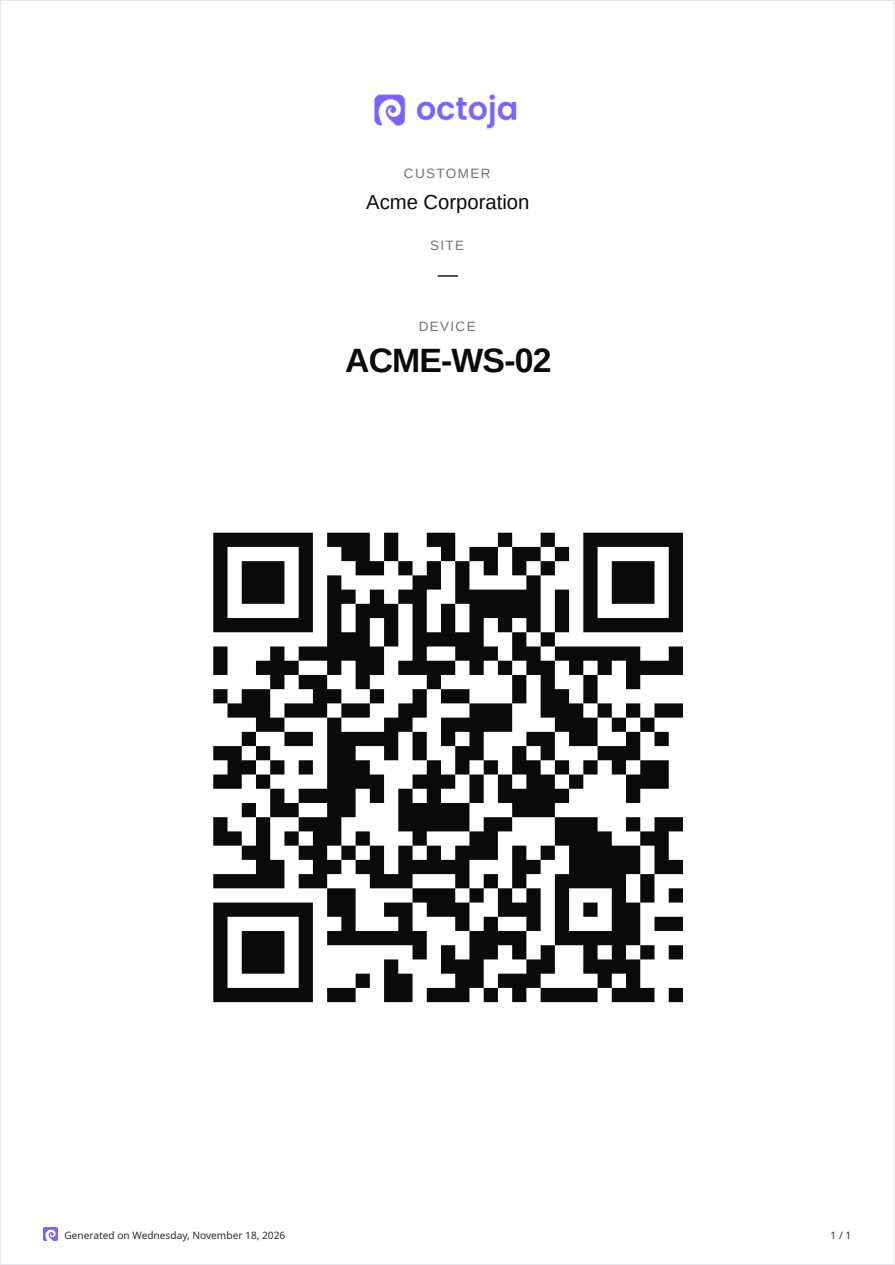
- Device QR codes — A new report creates a label for every device with a QR code that opens the device in octoja.
- Escalation in the same ticket — When an alert rises from Warning to Critical, octoja updates the ticket that is already open.
- Blocked updates at a glance — Patch cycles show which devices only have blocked updates, and a device's update list hides blocked updates by default.
- Remote support for older Windows servers — Remote desktop and the terminal also work on Windows Server 2012 R2.
- Six new checks — Kopia Backup, Proxmox Backup Server, WithSecure Elements, Folder Comparison, Log Keyword and Web Content Change.
New
- Alert escalation in the same ticket — When an alert on the same ticket target rises from Warning to Critical, octoja updates the ticket that is already open. An open case in octoja gets Critical priority and a history entry; its title, status and description stay as they were last edited. PSA tickets get an escalation note, and almost all ticket systems also raise their priority.
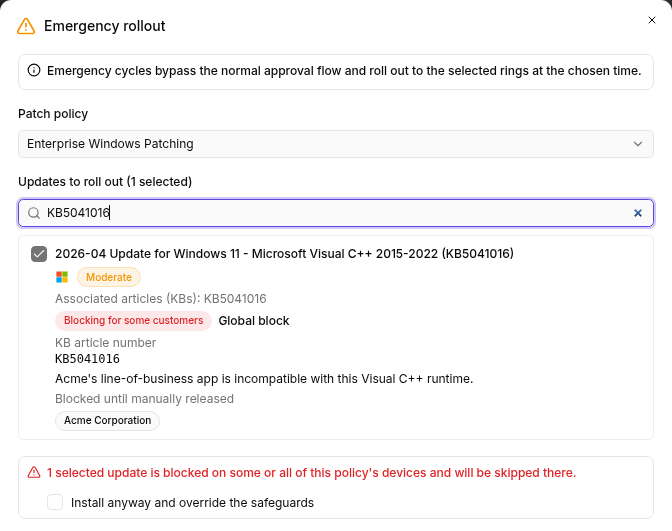
- Emergency rollout despite safeguards — An "Emergency rollout" names the selected updates that a safeguard blocks and installs them with "Install anyway and override the safeguards". A block that applies to only some customers of a policy shows as "Partially blocked", and without an override only those customers' devices skip the update. The override in the patch cycle as well as single and bulk installs on devices can override such blocks.
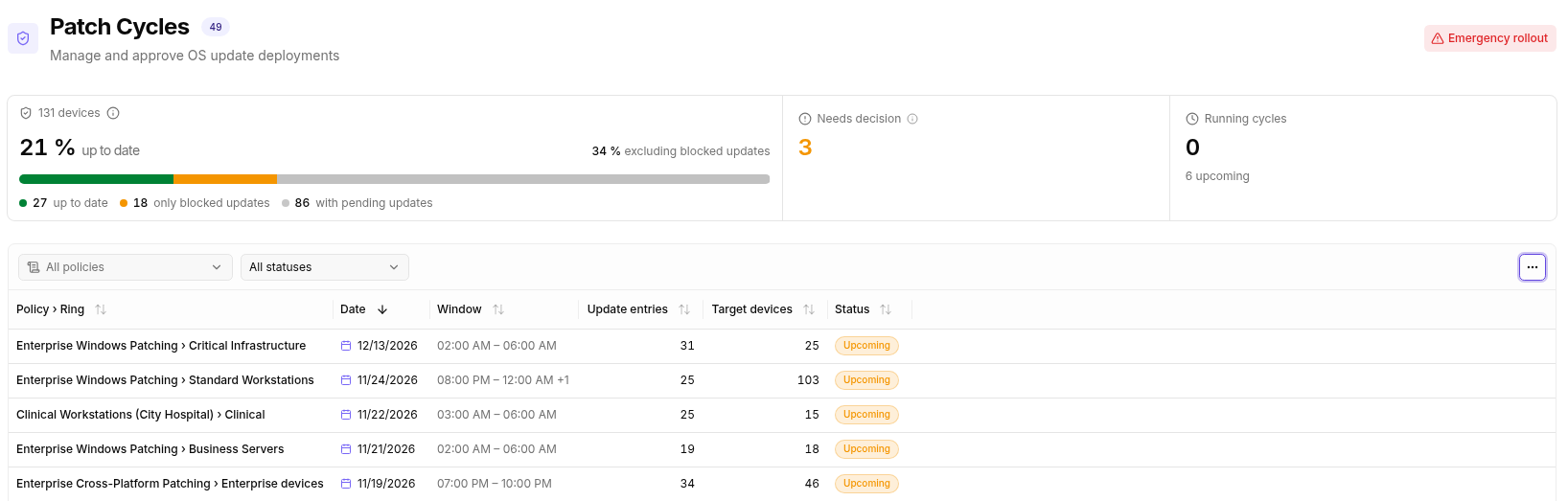
- Device overview in the patch cycle — The overview of a patch cycle shows in one bar how many devices are up to date, only have blocked updates, or are waiting for other updates. Next to the share of up-to-date devices is the share "excluding blocked updates". The columns of the cycle table are called "Update entries" and "Target devices".
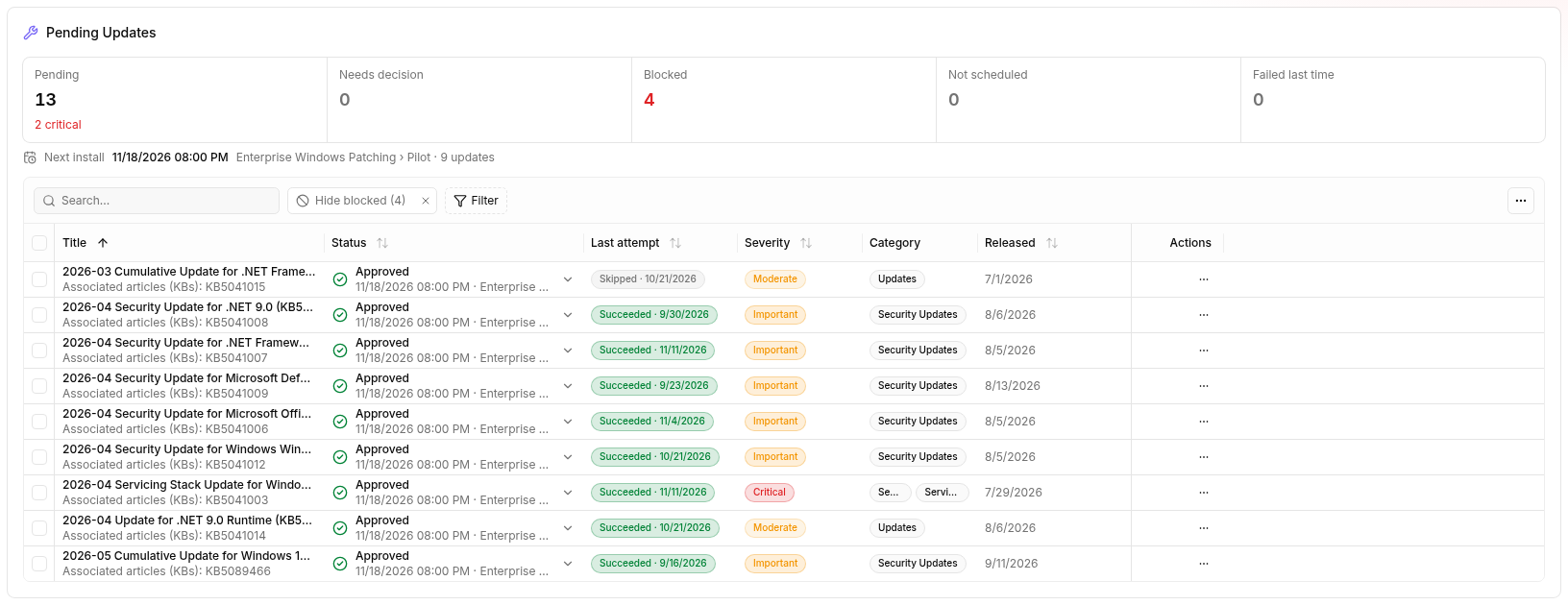
- Hide and filter blocked updates — A device's pending updates hide blocked updates by default with the "Hide blocked" filter; remove it to see them again. New "Severity" and "Category" filters narrow the list further.
- Log off domain users — In the "Logged-in users / sessions" table of a Windows device, "Log off user" also logs off domain users, for example on RDS servers and for disconnected sessions too.
- User accounts, sessions and administrator rights separated — "Local user accounts", "Logged-in users / sessions" and "Administrator rights on this device" are separate tables, and the rights show where they come from. Password, enable/disable and delete actions apply to local accounts only. On domain controllers, octoja shows no local accounts and points to Active Directory.
- "Device QR Codes" report — The new report creates one A4 page per device with a QR code that opens the device in octoja, and the logo of your branding. You create it from the device list with "Download QR codes", on a device with "Download QR code", or under "Reports" with filters for customer, site and device. A report covers up to 500 devices, and scheduled reports need a domain entered under "Settings → Custom Domain".
- Fit columns to content — Double-clicking a column's edge fits its width to the content of the current page, and "Fit columns to content" in the column menu does this for all columns. The default widths of the tables are tuned to their content; saved widths stay until you choose "Reset columns".
Improved
- Patch management: patching disabled on the agent — When patch management is disabled on the agent, octoja ends the run for that device right away and records "Patching is disabled on the agent." in the run and the device log. This needs agent version 1.1.1013 or later.
- Remote support on older Windows versions — Remote desktop works on Windows Server 2012 R2 and Windows 8.1 too, and without hardware H.264 octoja automatically picks another video format. The terminal, including "Shell as user" and in "Quick Support", runs on Windows versions before Windows 10 1809 such as Server 2012 R2 and Server 2016 (x64).
- Remote support: clipboard after the session ends — When a remote session ends, octoja clears the device's clipboard if it still holds text you pasted; anything the user copied since stays.
- Windows maintenance desktop (beta) and consent indicators — The maintenance desktop shows menus, captions and console fonts at normal size on scaled displays too. Technicians with the "Remote Desktop" and "Terminal" permissions on the device open it without a consent prompt, which is recorded in the device log. In the session picker, "Asks for consent" marks every session the user has to approve, and "Locked" marks only locked user sessions.
- Tables: search as you type — The search in devices, cases, patch updates, affected devices, logs, time entries and other large tables filters while you type.
- Device list: filters always visible — The "Device type" and "Customer" filters stay in the device list toolbar and open their picker with one click; "Site" joins them once a customer is selected. "Clear all filters" appears as soon as a filter is set.
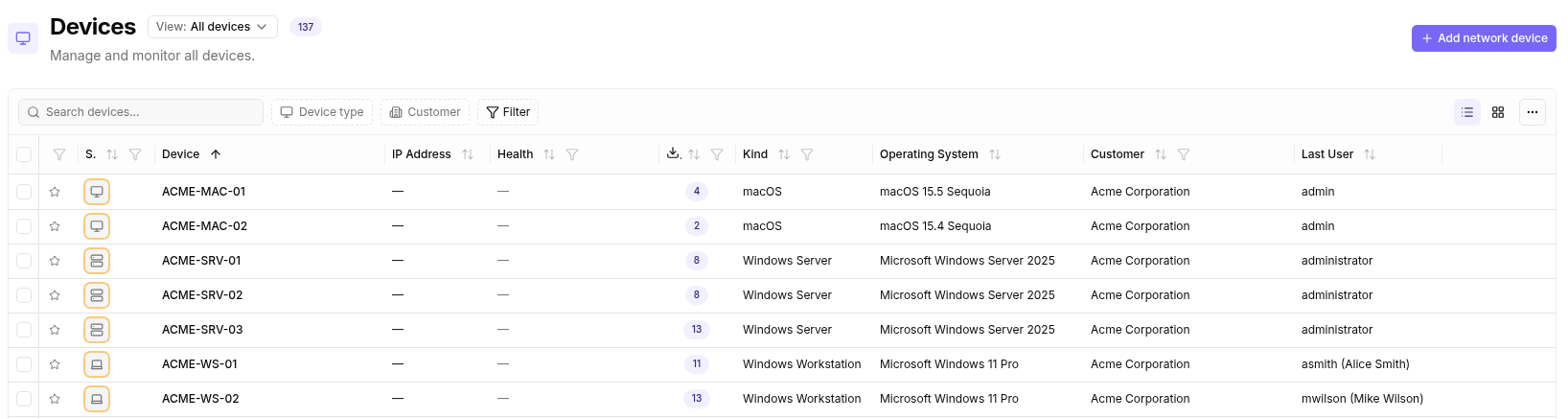
- Inventory: readable Lenovo model names — Lenovo devices show their model name such as "ThinkPad T14 Gen 5" in the inventory, from agent version 1.1.1013 on Windows and Linux. Syncs such as IT Glue and TANSS pick up the new name; adjust rules and filters that match the previous type number such as "21RV0017GE".
- Inventory: faster hardware and software export — Under "Inventory", the "Hardware" tab loads faster, and the CSV export of the "Software" tab finishes faster.
- Quick install on Linux and macOS — A Linux install downloads only the .deb or .rpm package the system installs, and the deployment page offers both packages as separate downloads. On Macs with Apple silicon, the quick install installs the native ARM64 package even when the terminal runs under Rosetta.
- Windows quick install with .NET Framework 4.6.2 — The quick install accepts .NET Framework 4.6.2 or later, so a Windows Server 2016 installs without a .NET update and restart. On older systems the script installs .NET Framework 4.6.2; if you restrict download destinations, allow download.visualstudio.microsoft.com for it.
Fixed
- Alerts, accepted results and tickets stay consistent — Accepted results and device overrides are kept even when a new check result arrives at the same moment, and a recovered alert stays closed even when its ticket is created late. "Manually resolve" on several alerts resolves all of them together or none, and octoja creates a PSA ticket once, even with slow ticket systems. When two people save the same alert configuration or configuration package at the same time, octoja rejects the later change with a message.
- Remote support: statistics while idle — When nothing changes on the remote screen, the "Statistics" of a remote desktop session show zero values, so the session stays recognizable as connected.
- Automations: conditions with multi-select fields — Conditions on multi-select custom fields compare whole options with "contains" and "does not contain", regardless of upper and lower case, and the editor offers the options to choose from. Saved conditions with "equals" or "not equals" on such fields are shown and evaluated as "contains" and "does not contain". Runs that were already waiting on a condition before the update still evaluate it with the old logic; cancel and restart them.
- Automations: status of script steps — A script step that a terminating PowerShell error ends counts as failed, for example a failed download with ErrorActionPreference "Stop" or a .NET exception even without "Stop", and its declared outputs are still collected. This applies to your own scripts and to built-in steps that, for example, install agents or create users by script. The page of a run shows its status as a readable badge.
- Automations: "Wake device" for many devices — Even when many devices are woken at the same time with "Wake device", by an automation or directly on the device, the instance stays responsive and automation runs complete. octoja bridges short database interruptions with automatic retries.
- Devices: assignments of returning devices — When a deleted device returns, such as a UniFi device in the controller or a newly enrolled agent, it gets its directly assigned checks, software, agent settings and maintenance back. Devices that have already returned get their assignments back automatically with the update.
- Inventory: macOS storage and inventory refresh — On macOS, inventory, live disk data and automatic disk checks count the storage once, even when the APFS Recovery volume is mounted. The inventory refresh works on devices whose stored inventory still holds fields from an older agent version too.
- Vulnerabilities on all affected devices — The "Resolve vulnerability" dialog lists every device in your access scope that has the same vulnerability.
- Acronis, Bitdefender GravityZone and Woasi — The Acronis sync updates protection status, alerts, new devices and agentless Hyper-V guests every 30 minutes. The automation step "Roll out Bitdefender agent" runs independently of fetching GravityZone incidents, and "Companies without EDR license" follows each company's license. Woasi tickets contain the full alert description with check, device, status, time window and link, plus the detailed check result.
- Reports: Markdown in the "Custom Fields (Table)" widget — The widget shows Markdown fields formatted, with headings, emphasis, lists and links.
- Custom packages: version picker — In the version picker of a custom package, the status of a highlighted version stays readable, in the light and dark theme and with a custom brand color.
Checks
Check updates are rolled out independently of the octoja release.
- Kopia Backup — New check for all snapshot sources of a Kopia server, including those of remote clients: age of the last snapshot, failed files, paused or incomplete snapshots and the connection to the repository. It needs a Kopia server with fixed credentials.
- Proxmox Backup Server — New check through the read-only API of Proxmox Backup Server: datastore usage, age of the last backup per group and namespace, backup tasks and sync jobs. It runs on any agent with network access to the server and needs an API token with the Audit role, plus RemoteAudit on /remote for sync jobs.
- WithSecure Elements — New Windows check for the WithSecure Elements Agent (formerly F-Secure): services, real-time scanning and DeepGuard, age of the malware definitions, protection status and items in quarantine. With the WMI provider turned on, it also checks the connection to Elements Security Center, the license and pending restarts.
- Folder Comparison — New check that compares a reference folder with a copy file by file and reports missing, extra or different files, for example after a replication or restore. It runs on Windows, Linux and macOS.
- Log Keyword — New check that searches log files on Windows, Linux and macOS for keywords and alerts on matching new lines; ignore keywords filter out known messages. The first run sets a baseline without alerting, and rotated log files are detected.
- Web Content Change — New check that reports when the content of a web page differs from the last accepted reference, or optionally when it stays unchanged. You accept an intended change with "Accept current content".
- Cove Backup — The check rates single data sources such as FileSystem or SystemState by their completed backups, and under "Data sources" you select several sources together. If a selected source is missing, the check warns.
- Disk Space — With "Free space automatically", the check deletes temporary system files on that drive that are older than the configured minimum age when it crosses a threshold, and measures again. The result states the freed space and stays at least a warning for that run.
- Filesystem Integrity — The check reports for every volume on Windows Server 2019 too whether it is clean or marked dirty.
- SMART Disk Health — On Windows, every disk appears once, even when SMART and Windows storage identify it differently, for example with NVMe. Detailed SMART values and their alerts take priority.
- Antivirus Status and Sophos Antivirus — Antivirus Status skips Windows Security Center entries for uninstalled products and lists them in the output. When Sophos real-time protection cannot be queried on Windows, Sophos Antivirus reports it as "not determinable", while confirmed inactive protection keeps its configured severity. The short notification shows services and real-time protection separately.
- Failed Logins — On Windows, the check reads only the failed logins within the configured time window from the Security log, event by event, even with very large logs.
- Veeam Backup & Replication — With "Monitor all job types", the check also monitors backup jobs for Entra ID tenants. Jobs that completed with a warning also escalate to Warning or Critical according to the configured age thresholds. In "Cadence-aware (from job schedule)" mode, the check reports periodically scheduled Entra ID jobs with an unknown schedule as a warning; with "Manual (fixed hours)" the fixed age thresholds apply.
- Windows Backup — The check calculates a backup's age independently of the server's time zone and reads the backup target and recoverable items on German and other localized servers too. When recovery details are missing, it shows them as unknown.
- Adaptec RAID (SNMP) — The check detects controllers with the maxView 3.x and 4.x SNMP layout and reads their actual health as well as battery, ZMM and operational status.
- Printer (SNMP) — The check treats supply levels that a printer reports without a percentage as present. With "Monitor consumables" you turn off the consumables check for printers without a consumables table, such as label printers.
- TERRA CLOUD Backup — The check also monitors Linux agents (x64 and ARM64) and uses the platform's default path when no "Agent directory" is set. Ransomware protection counts as enabled when the status explicitly reports it and otherwise stays unknown.