octoja v1.0.701 — Update blocking, dashboard filters and more
Highlights
This release puts more control in your hands across patching, monitoring and the dashboard. You can now block a specific Windows update across every device, see vendor and community advisories right in the update catalog, and disable or fine-tune a monitoring check on a single device without touching the rest of its group. The device dashboard gains update-status filtering and per-column header filters, a device's logs are one click away, and you finally get a proper overview of your installation tokens. The rest is polish and reliability — checks run on their real schedule again, copy and paste works in the terminal, large installers no longer run out of memory, and servers stop showing up as workstations.
New
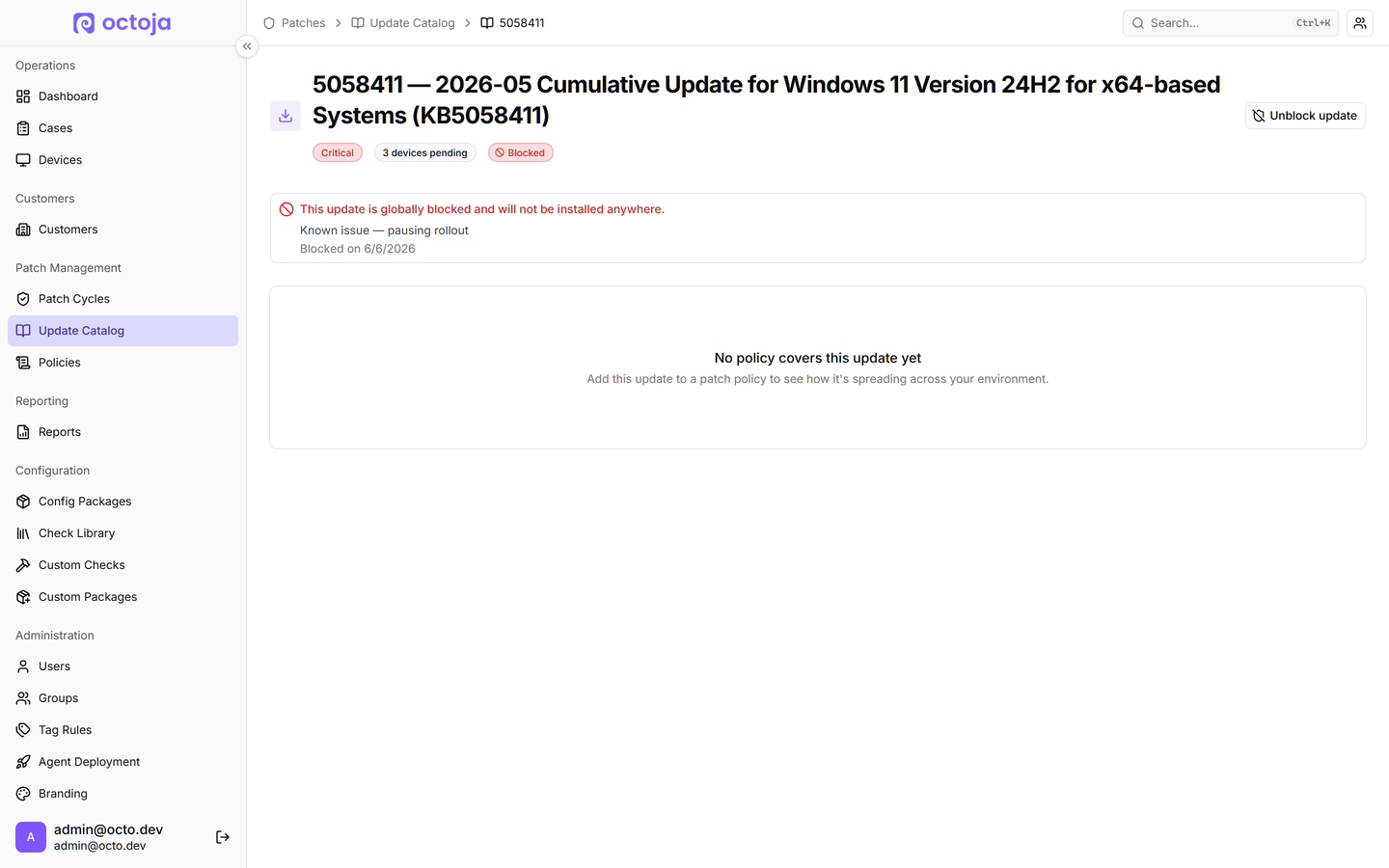
- Block a Windows update across every device — You can now block a specific Windows update by its KB number so octoja never installs it on any device. The update catalog also surfaces advisory information — vendor known issues and community reports — so you can see whether an update is known to be problematic.

- Filter the device dashboard by update status — The dashboard gets a filter for device update status — Pending, Current, or Unknown — and the device table's column headers now carry their own filter popovers for update status, OS and role, and online state.

- Disable or override a check per device — You can now turn off a monitoring check on a single device, or override its settings just for that device, without affecting the other devices the config package targets.
- Download a device's logs in one click — A new Download logs action on the device page bundles the agent's logs into a single zip and downloads them straight to your browser — no more digging through the Files tab to find where logs live.

- Installation-token overview with revoke — A new admin page lists your installation tokens, shows how much each has been used, and lets you revoke ones you no longer want. The deployment wizard no longer quietly creates a throwaway token every time you open it.

- Choose your start page — In your profile you can now pick which page you land on after signing in — Dashboard, Cases, Devices, Customers or Patch Cycles; single sign-on logins still open the dashboard. There's also a new option to open devices in a new browser tab.

- Change a device's type — Devices are classified as Server or Workstation automatically from their operating system, but you can now correct that from the device menu when a workstation is actually used as a server, or the other way around.

- Custom window title for white-label instances — Admins can now set the browser tab title to their own product name instead of octoja, and the branding page is reorganised into clearer sections.

Improved
- Read-only access to Cases — Cases now have a separate read-only permission, so you can give someone visibility into cases without granting the rights to create, edit or comment.
- Richer live process list — The device's live processes tab now shows current CPU usage, committed and paged memory, thread and handle counts alongside the existing columns, and sorts by memory use so the heaviest processes surface first.
- User Account check: full inventory and history — The User Account check now lists every account on the machine with enabled, admin, locked and inactive breakdowns, highlights the flagged ones, and keeps a per-run history with a trend of accounts added or removed over time.
- The SMART check explains why a disk failed — When a disk reports a problem, the check's detail view now names the exact condition that tripped — a failing attribute, an over-temperature reading or a drive's own self-assessment failure — instead of just showing a red status. Check results across the built-in checks now appear in your language too.
- NVMe-aware disk temperatures — The SMART check now uses higher warning and error temperatures for NVMe drives, which run hotter than hard drives by design, so healthy NVMe drives no longer trip false alarms. Both thresholds stay configurable.
- Dashboard columns follow your check filter — When you filter the dashboard by specific checks, the grid now shows only those checks as columns instead of every check the matched devices happen to have, so the status you filtered for is immediately obvious.
- Consistent check-type names on the dashboard — Dashboard check filters and columns now label each check by its canonical name in your language, so the same check no longer appears under different names depending on which language a device was configured in.
- Service picker shows friendly names — In the Service Status check, the service picker's dropdown now shows the friendly display name with the underlying service name in brackets, while the selected chips always show the exact stored value — so the label reads the same whether you edit the check on a device or in a config package.
Fixed
- Checks run on their real interval — A check set to run less often than every 30 minutes — such as a daily User Account audit — was quietly running every 30 minutes instead. Checks now honour their configured interval.
- Custom-package parameters are saved and editable — Per-deployment parameter values for a custom software package could be silently dropped on save, couldn't be viewed again, and were wiped when you edited the deployment. They're now stored reliably, shown when you reopen the deployment, and kept when you make changes.
- Copy and paste in the device terminal — Copy and paste now work in the device toolbox terminal on Windows and Linux. Ctrl+C and Ctrl+V used to print control characters instead of copying or pasting.
- Large installers no longer run out of memory — Creating a custom software package from a large MSI installer could fail with an out-of-memory error before the upload even started. Large installers are now processed in small pieces and go through reliably.
- Servers classify correctly from the start — Some Windows Server machines were initially shown as workstations. They are now identified as servers from the moment they enrol.
- Inventory saves no longer fail on unusual characters — A stray character picked up from a device — for example in an installed program's name — could make that device's inventory fail to save over and over. Those characters are now handled cleanly so inventory saves through.
- Cleaner Veeam check errors — When the Veeam module couldn't be loaded, the Veeam Backup check used to surface a long block of garbled text as its error. It now reports a clear, readable message.
- "Update all" stops flagging benign results as errors — Patching all packages with WinGet or Chocolatey marked packages that were already current as red errors, and occasionally invented phantom “updated” lines. Each package's result is now reported accurately.
- Custom Linux checks handle multi-line output — A custom check on Linux that returned multi-line output — for example the result of a command like ifconfig — used to fail. Such checks now run correctly.
- Homebrew installs on a fresh Mac — Deploying a Homebrew package to a Mac that didn't already have Homebrew failed, even for administrator accounts. The install now completes reliably.
- Cleaner Linux inventory — On Linux, apt package names no longer show stray quote characters before them, and virtual container filesystems no longer appear as empty 0-byte drives in the device's storage inventory.
- Network Interface check keeps the real adapter on Hyper-V guests — On a Hyper-V virtual machine, the check's “exclude virtual adapters” option wrongly hid the machine's real network adapter and reported no interfaces. The real adapter is now kept while genuinely virtual ones stay filtered.
- Day names in the schedule picker — The monthly weekday selectors in the schedule picker showed raw placeholder text instead of day names. They now show the correct localised day names.
- Report builder wraps long widget names — Long widget names in the report editor's widget palette were cut off mid-word. They now wrap onto a second line so you can read the full name.
- More accurate Lywand tracking — Whether a device is tracked by Lywand is now read directly from Lywand's own list of scan targets, instead of being inferred. This stops a device from being scored against a foreign Lywand account and lets clean scanned machines rank correctly.