octoja v1.0.1035 — Integrations, antivirus & executive reports
Highlights
This release is all about connecting octoja to the rest of your stack. Six antivirus and EDR platforms, nine helpdesk and PSA systems, and two documentation tools can now be wired straight into octoja — so protection status, alarm tickets, and your asset inventory stay in sync without manual work. Alongside that: a one-glance executive report for your customers and a new check for UniFi networks. The rest is polish and reliability — clearer patch policies, sortable tables, and a batch of cross-platform fixes for macOS and Linux.
New
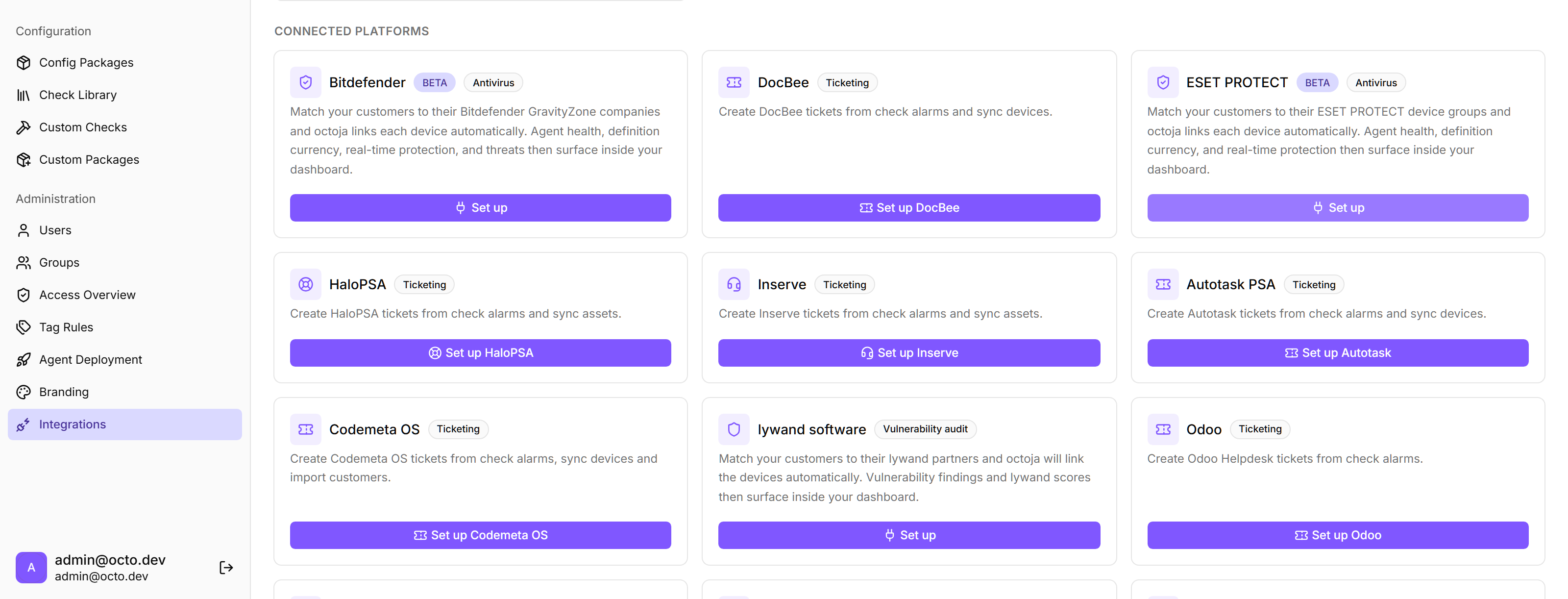
- Antivirus & EDR integrations — Connect Bitdefender GravityZone, Sophos Central, ESET PROTECT, Securepoint Antivirus Pro, ThreatDown, and SentinelOne. octoja pulls each platform's protection status — such as agent health, definition currency, real-time protection, and active threats — and surfaces it as a check, so unprotected or at-risk devices show up next to everything else. Marked BETA.
- Helpdesk & PSA integrations — Open a ticket automatically when a check alarms and close it on recovery, across DocBee, HaloPSA, Autotask, Inserve, Odoo Helpdesk, Jira Service Management, TOPdesk, TANSS (BETA), and Codemeta. Most also map your customers and sites and sync devices into the connected system.
- Documentation sync: IT Glue & Hudu — Sync your octoja devices straight into IT Glue Configurations or Hudu Assets, kept up to date automatically per customer.
- Executive report — A new customer-scoped report (Chefbericht) that opens with an at-a-glance scorecard — devices online, patches current, AV protection, backups, and monitoring — followed by the key metrics and the proactive work done during the period. Built to hand straight to a customer's management.

- Access overview — A new admin page that shows who can access which customers and devices, and why — by user, by customer, or by device, including the groups that grant the access.

- UniFi network check — A new check monitors Ubiquiti UniFi switches, gateways, and access points over SNMP, on Windows, macOS, and Linux.
- Remote-desktop resolution control — Change the resolution of the Windows display you're remoting into, right from the session settings, applied live.
- View Reports permission — A new permission lets you grant read and run access to reports separately from the ability to manage report templates.
Improved
- Integrations grouped by category — The connected-platforms area now groups integrations by what they do and floats your connected platforms to the top, so the list stays readable as it grows.

- Sortable admin tables — The email, webhook, and Teams channel tables and the patch-cycle tables can now be sorted; severity sorts by rank rather than alphabetically.
- Clearer patch policies — The Auto-Promotion and Exclusions sections of a patch policy now explain in plain terms what each setting does, with a hint on every threshold.

- Hide disabled checks — In a device's Checks tab, disabled checks are now hidden by default, with a “Show disabled” toggle to bring them back.
- Richer Teams alert cards — Teams alerts now carry the same detail as email: device and customer context, the check's output, and a button that jumps straight to the device — in the channel's language.
- Clickable customer & site in the breadcrumb — On a device page, the customer and site in the navigation path are now links that open a device list already filtered to that customer or site.
- Cadence-aware backup age (Veeam) — The Veeam backup-age check can now derive the expected age from each job's schedule, so weekly or monthly jobs no longer false-alarm just for running less often. Fixed thresholds remain the default.
- Localized keyboard shortcut hint — The search shortcut hint is now localized — German shows Strg+K instead of Ctrl+K.
- Links use your own domain — The device links in alarm emails and integration tickets now use your tenant's own domain when you've set one, instead of the default octoja address.
- Tag rules apply immediately — Creating a tag rule now tags all matching devices right away, instead of waiting for each device's next check-in.
Fixed
- macOS & Linux user details — On macOS and Linux, the user-account check no longer shows “Unknown” for last login, the Local users table now fills in Last login and Password last set, and the live status column shows who is currently logged in.
- Remote NumLock left alone from a Mac — Controlling a Windows machine from a Mac no longer silently switches the remote NumLock off, which had broken click-and-drag text selection.
- macOS agent uninstall — Removing a device now fully uninstalls the agent on macOS, instead of reporting success while leaving files behind.
- Report PDF layout — Report PDFs no longer overlap widgets or split them awkwardly across page breaks.
- Customer matching in integrations — Deleting a matched customer no longer breaks an integration's matching dialog, so you can save your customer assignments again.
- Synology check — A healthy Synology NAS is no longer falsely reported as 100% full, and RAID status is now read correctly.
- Email channels in the check dialog — Email recipients in a check's alert summary are now labeled correctly — they previously showed as “Webhook” — and show the inactive badge when disabled.
- SNMP custom checks report the cause — Simple-mode SNMP custom checks now show why they failed instead of a bare “Failure”, and no longer report success when the community string is wrong or the value doesn't exist.