octoja v1.0.2403 — Maintenance mode, bulk device actions, and mail from your own address
Highlights
This release is about reach and control. Devices gain a maintenance mode and bulk actions, so a whole set can be taken out of the firing line or changed in one go. Device tables gain saved views, you can create local user accounts and search a registry straight from a device, and send mail from your own address. Seven new checks arrive, and monitoring starts running on AlmaLinux 8, Rocky Linux 8, RHEL 8, Debian 10 and Ubuntu 18.04 as each check publishes its next version. The rest is polish and reliability — software deployment through winget works again, several checks stop crying wolf, and a handful start reporting problems they used to hide.
New
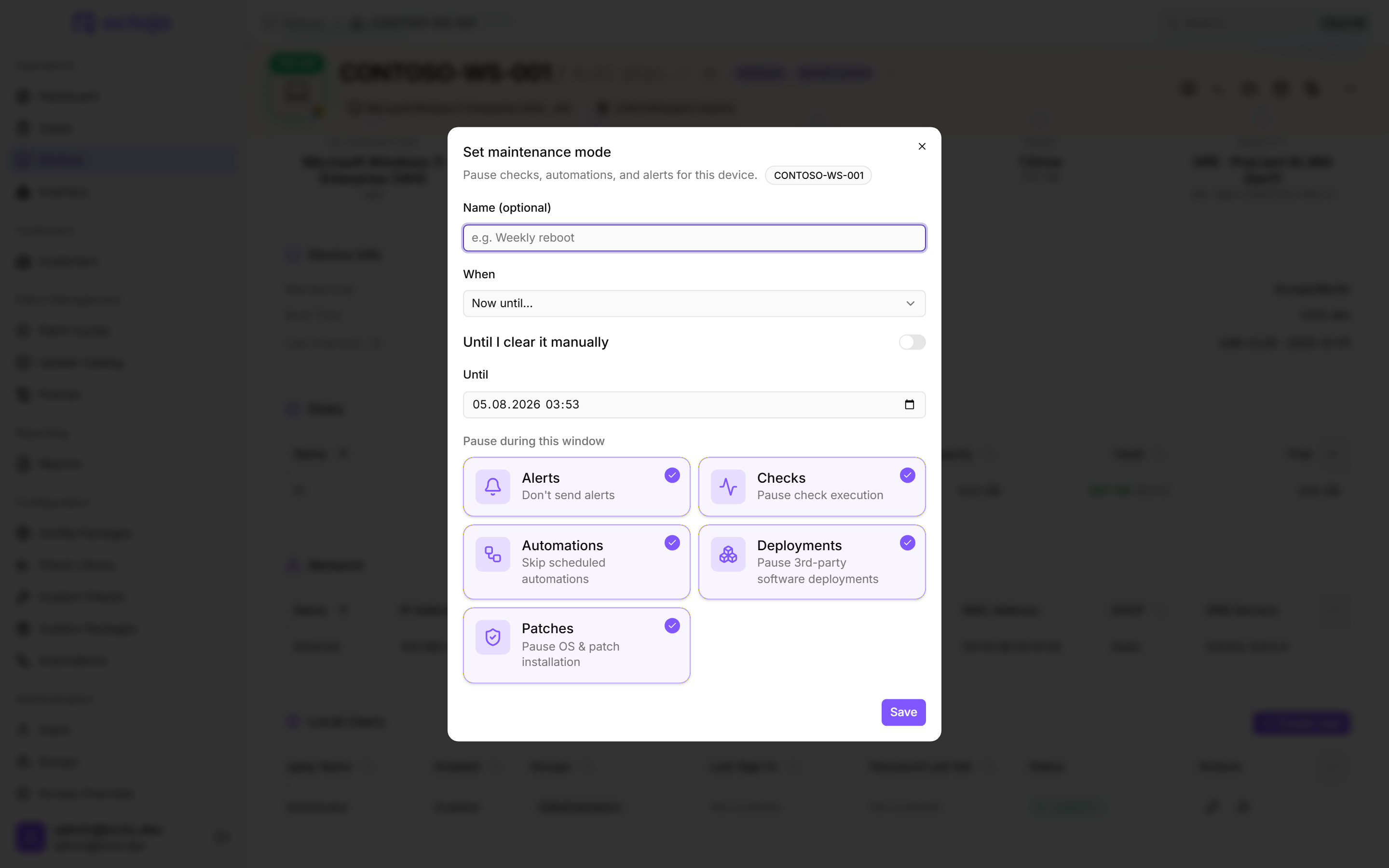
Maintenance mode for devices — Take a device out of service now, on a schedule or recurring: under Pause during this window all five boxes — Checks, Automations, Alerts, Deployments and Patches — are ticked from the start; untick Deployments and Patches if the device must keep deploying and patching. Config packages carry fleet-wide windows that Clear maintenance never removes; administrator groups hold the new Maintenance mode permission already, every other group has to be granted it.
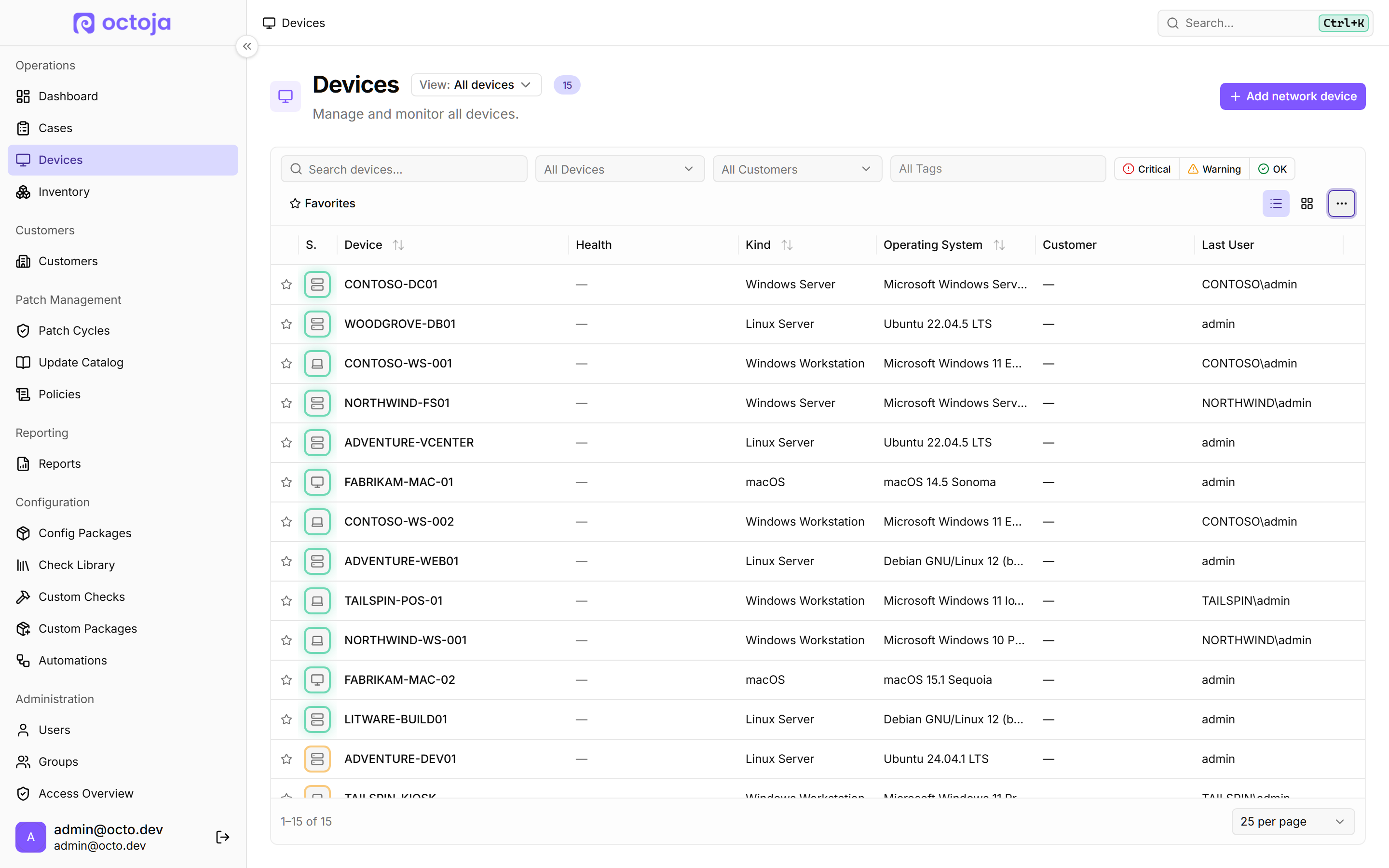
Act on many devices at once — Switch a device list into Multiselect from the table's overflow menu — there are no row checkboxes until you do — then pick your rows and use Assign customer, Assign tag or Maintenance; Clear maintenance mode removes only the window set directly on each device, never one coming from a config package. More actions adds Send notification, Wake, Export selection, Delete and Run automation — that last entry is hidden outright, not greyed out, without the global Manage Automations permission. Every row stays selectable now: devices you lack the right for are skipped and counted, and Delete asks you to type DELETE before it removes the selected devices and their history for good.
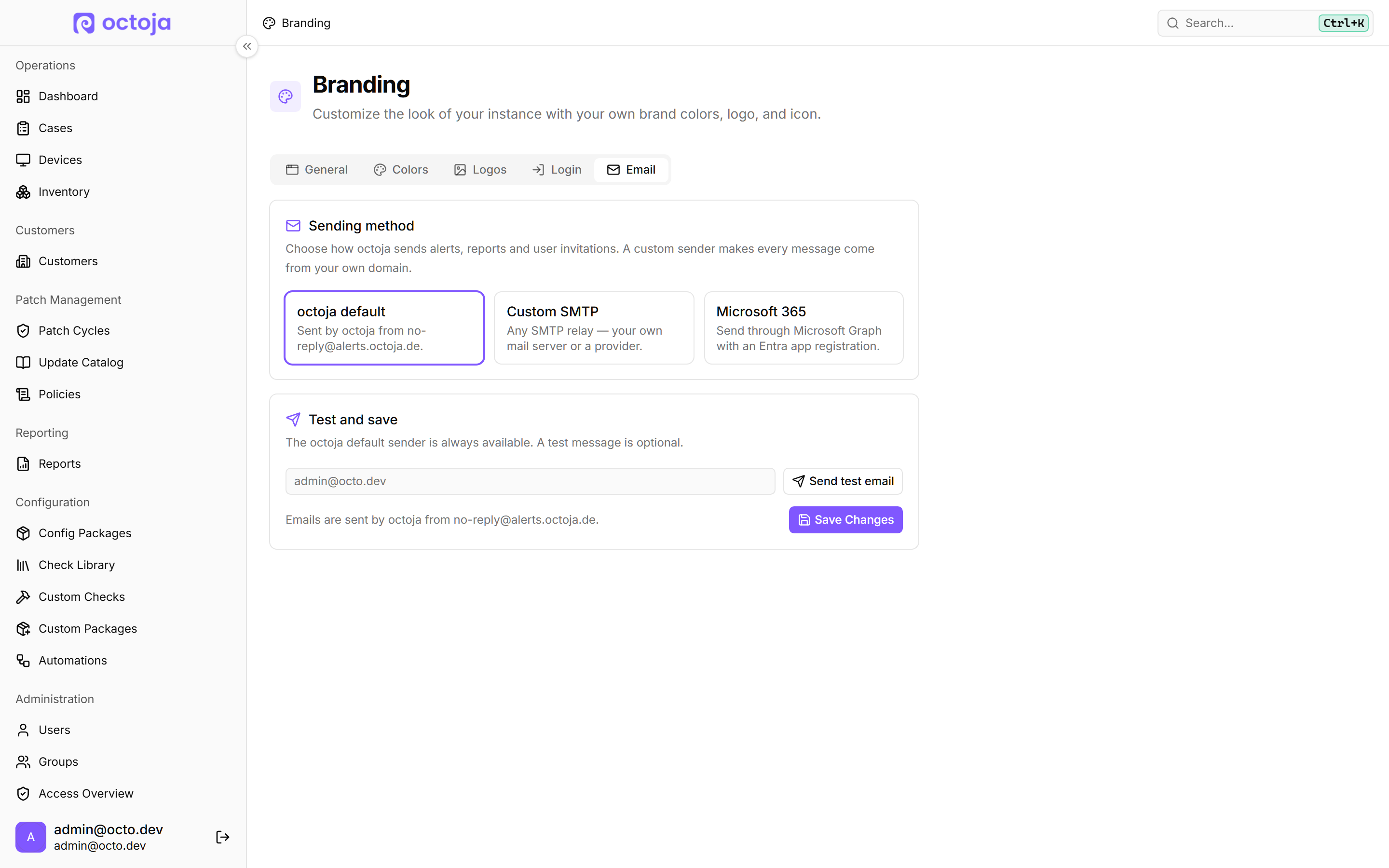
Send email from your own address — Under Branding, the new Email tab picks a Sending method — octoja default, Custom SMTP or Microsoft 365 — so alerts, reports and invitations leave your own domain. Saving needs a test email that actually went through; existing instances stay on the octoja default until an administrator switches.
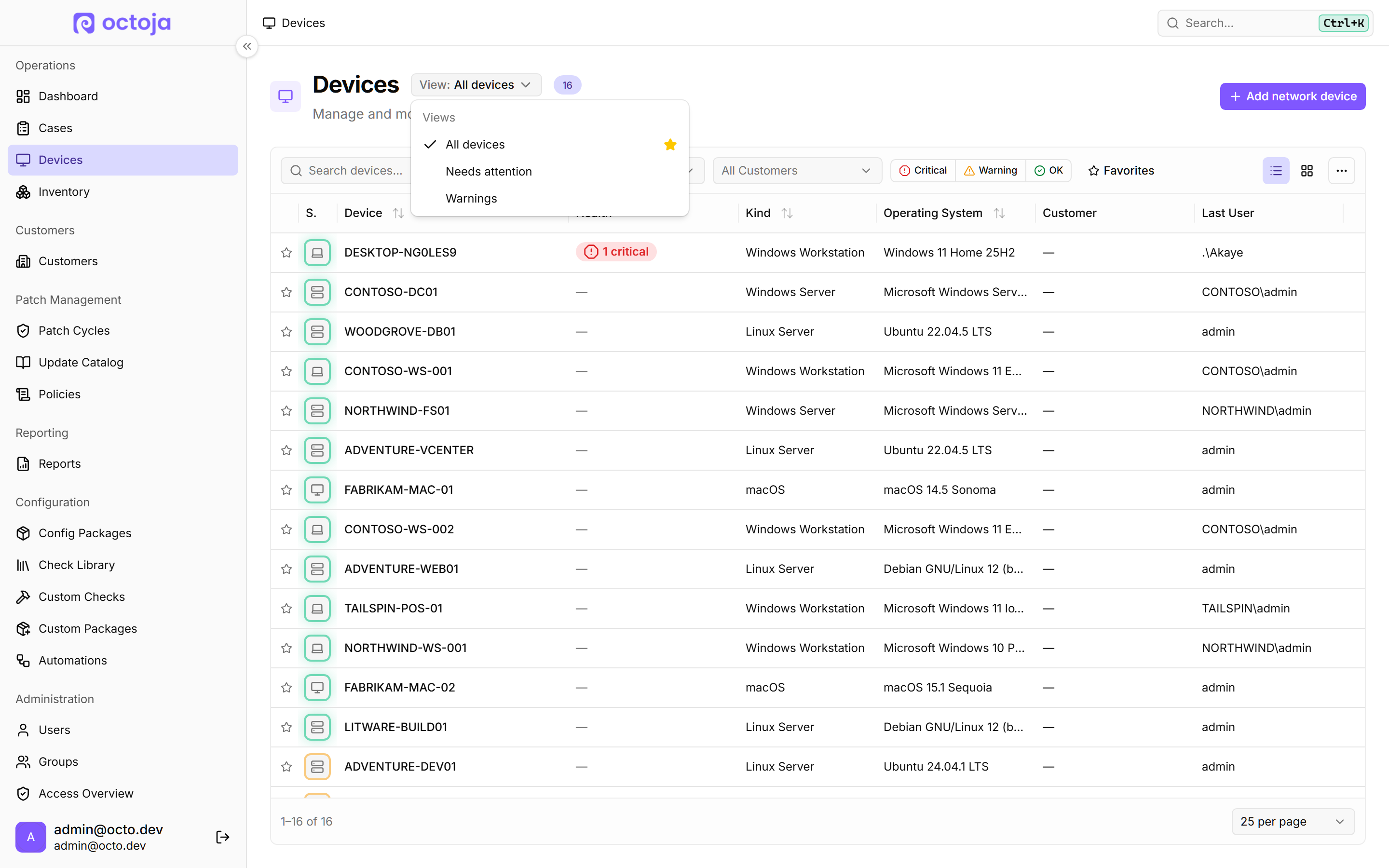
Saved views for device tables — Save the columns, sorting, widths and filters you use on Devices and the dashboard as a named view, and mark one as your default from the view menu (Set as my default). The page address carries your layout, so a link shares it.
Manage local users from a device — Create a local account, enable or disable one, or change its password from the Local Users section, on Windows, Linux and macOS. The new Local user management permission governs it, and administrator groups have it already.

Zammad integration — Connect Zammad under Integrations: a check alert opens a ticket in your Ticket group, and your Recovery state applies when the check clears. Map each customer to a Zammad organisation, or import them from Zammad. Matching is optional — tickets still open in your Ticket group either way, with the customer name in the ticket text.
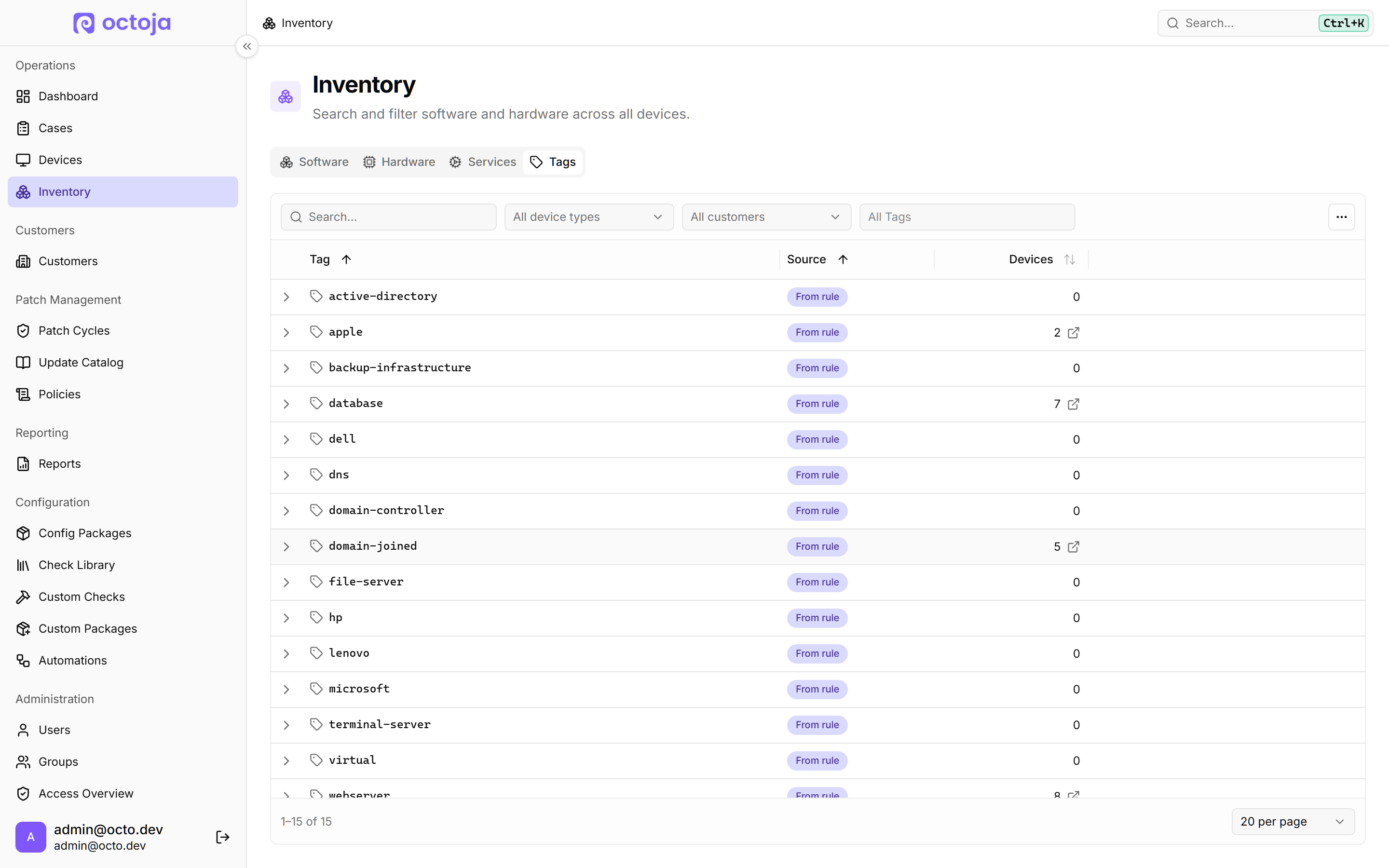
Filter devices by tag, and see every tag you use — Device lists gain a tag filter that travels in the page address and into saved views. Inventory gains a Tags tab listing every tag with its device count and Source — Own or From rule; click a count to open that device list.
Schedule patch rings around Patch Tuesday — A patch policy can hang off Patch Tuesday: pick the Patch Tuesday at 02:00 template, then set Days after the reference Tuesday — up to 31 days after the month's second or third Tuesday. Build rings: one on the day, the next a week later.
Export a device's event log — Export an Event Log as an XML archive (.zip) carrying every filter you set, search text included, or a Native log (.evtx) that applies only the level, event ID and date filters, so it holds more than the list shows. With no date range picked, octoja warns before exporting the whole log. The existing Event Log permission governs this — anyone who could read a device's log can now download all of it, and there is no separate export right to withhold.
Screen-text recognition and mapped network drives — Search screen text (OCR in the toolbar) reads a box you draw on the remote screen: Copy text or Search with Google, all in your browser. The file explorer lists mapped drives as Network drive — Windows only, and a share opens only while the user who mapped it is signed in.
Share your own checks with another octoja instance — On Custom Checks, Repository access hands out a repository URL and credentials exposing the checks you pick. Another octoja instance syncs them in under Add community repo. A community repository with a username now needs an HTTPS URL — loopback addresses excepted — so an existing HTTP entry with credentials fails the next time you edit it.
Customer custom fields everywhere — Fields you keep on a customer are now available as columns in the customer list, as a rule criterion (Customer Custom Field) and as automation variables (under Custom fields (Customer)); device fields sit beside them under Custom fields (Device).
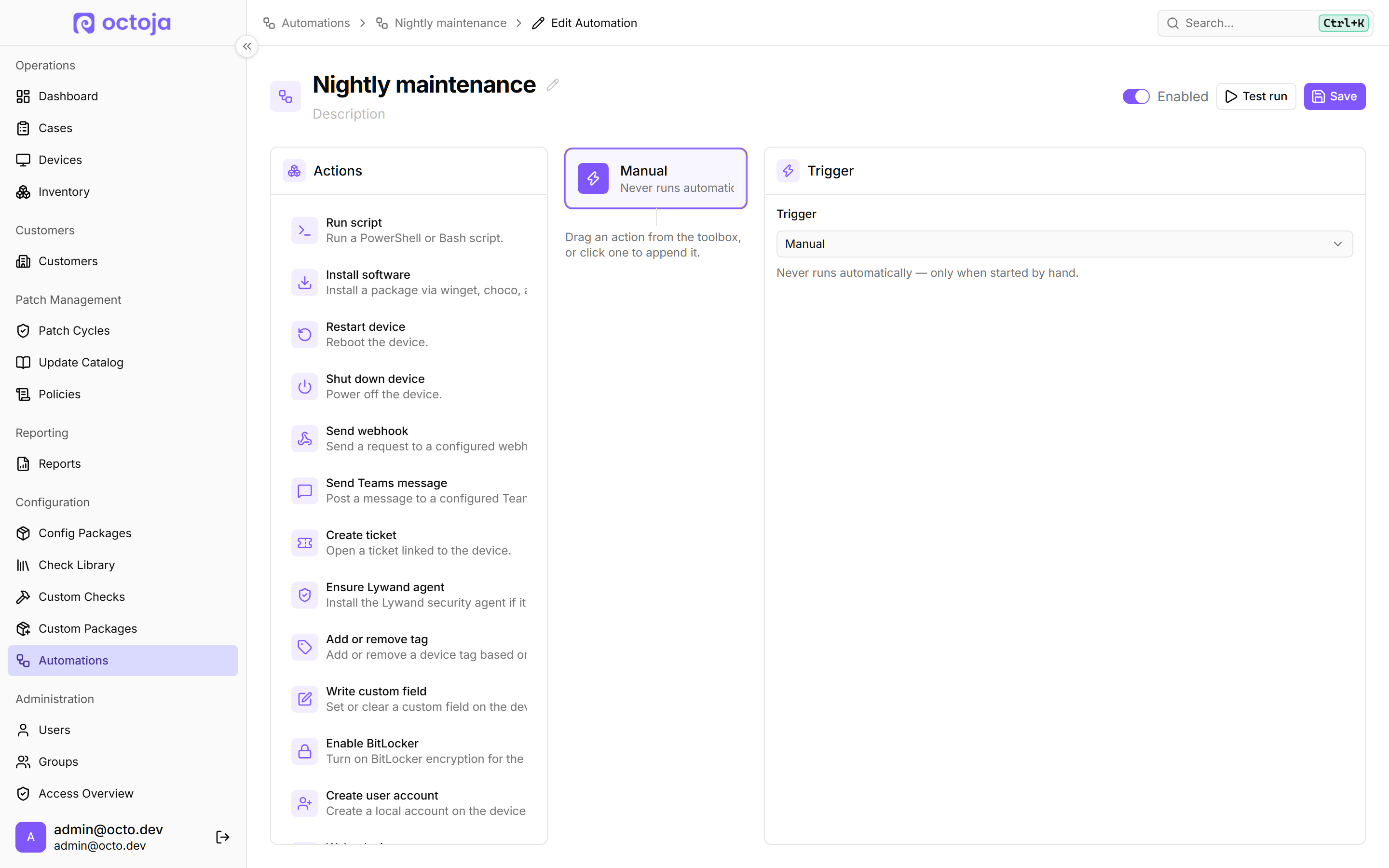
Four new automation building blocks — An On boot trigger that fires once per actual reboot, plus Enable BitLocker, Create user account and Wake device steps. Create user account is the same operation you can run on a single device, now scriptable across the fleet.
Stop a running automation — Open a run from its history and cancel it with Cancel run — the button sits in a run's detail view, not in the run list. The current step finishes, then nothing further starts. A run that hangs now ends as Timed out.
Scope a report to specific devices — Restrict a report template to matching devices — only servers, or everything with a certain tag; the pending-patches widget gained a filter of its own. You can also hide individual checks from the monitoring widgets and the Management scorecard.
Partial tag matching in rules — Tag conditions everywhere the rule builder appears — Groups, Tag Rules, Config Packages, patch policies and automations — now offer “matches text” and “does not match text”, so one rule catches every tag containing a word.
See which config packages apply to a device — A device's three-dot menu gains Config Packages, listing every rule-based package that reaches it with its description, its Contents — checks, deployments, automations or agent settings — and a link into the package. If none matches, the empty state says so and points to the Checks tab.
More of a device's hardware on the page: monitors and memory modules — Connected Monitors lists each screen's Manufacturer, Model, Connection and Serial Number; changes land in Inventory History. Memory Modules add Slot, Type, Vendor and Part Number on Windows, Linux and macOS. Monitors are Windows only, the card stays hidden until one is reported, rows with no identifier at all — headless machines and RDP phantom adapters — are dropped, unreported details show as Not available, and on Apple Silicon the built-in memory reports no slot, so Bank no longer falls back to the memory type there.
Decide what the customer sees before a remote session starts — A user's Remote Support Display Name replaces the technician's name in the consent prompt on the customer's device, and shows up only where a prompt appears at all; leave it empty and the user name shows as before. On terminal servers, Allow physical console access without consent on Terminal Servers (off by default) skips the prompt at the console, but only while Require user consent for remote desktop is still on; RDP sessions on that server still ask. The consent-bypass right, used with a reason, still overrides both.
See who is in an Active Directory group — On a domain controller, the Manage members button in the Active Directory Groups table opens a dialog that reads the group live. Add or remove members there.
Remote Times report — Shows the time spent in the remote toolbox on a customer's devices — terminal, files and remote desktop all count towards one session. The built-in report lists it per device and per session.
Search a device's registry — and keep browsing while it runs — Press Ctrl+F in the Registry Editor to search key names, value names or value data, under All hives or This key. The search keeps running when you close the box, so you can browse on and find the hits waiting. Deeply nested keys open faster.
Your personal referral link — My Profile gains a Recommend octoja section with your own referral link: copy it, pass it to colleagues and partners, and if they become octoja customers, a surprise is waiting. The section stays hidden on instances without a referral address configured.
Improved
Patch screens say what happened and why — Alongside release dates, categories and the covering policy, every update in a Windows patch run carries a Selection line with the reason, plus Satisfied rules, Matched exclusions and Blocked KBs. The free-text Skipped by the device message is gone, and update titles link into octoja.
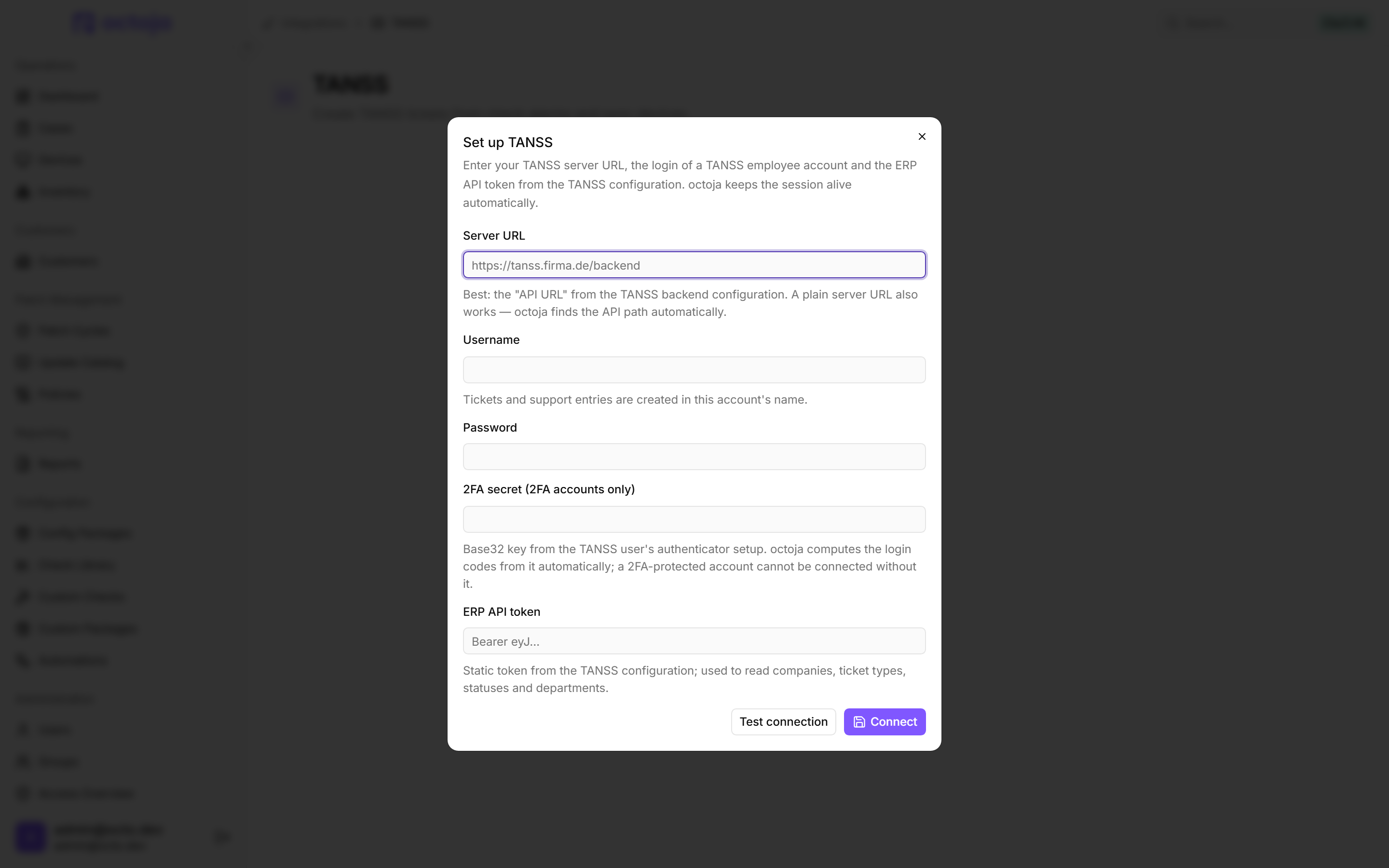
TANSS now needs your 2FA secret — plus a remitter and close-on-recovery — An account with two-factor authentication now needs its 2FA secret (2FA accounts only); the one-time code field is gone, so set those connections up again and octoja derives every sign-in code from the secret. Alert tickets now reach TANSS reliably instead of failing a few hours after you connect, and each new ticket hangs off the device that raised the alarm. Two new settings sit next to Assigned department: Close ticket on recovery, and Remitter — the employee new tickets are reported by, so the TANSS instances that demand one stop rejecting the ticket; leave it empty to keep using the connected account.
Device search: faster, and it finds a serial number — Ctrl+K, device lists and pickers keep up with your typing, and search now matches manufacturer, serial number, operating system and public IP. The new fields work from a device's next inventory run. Search still matches the exact characters you type — a name with ä, é, ø, ñ, å or ç is only found by typing the accented character — and an operating system or public address now hits every device sharing it.
Custom fields and checks now work in both directions — Custom check and SNMP outputs still write into a device custom field; now a number-typed check setting can read one, falling back to the field's Default value, and SNMP probes gained a Unit next to the OID, so a temperature reads 42 °C instead of a bare 42. Checks already using a field token therefore change behaviour on devices with no value of their own: they evaluate against that default instead of against nothing, so a threshold suddenly compares against a real number. The mapping lives on the check itself — set it again there if a config package set it; Insert custom field appears only once the tenant has a number-typed device field, and Unit only on numeric SNMP probe kinds — switch a probe to a text kind and a unit you entered stops taking effect.
What your customers receive: their language, your brand — SMS, calls and app push now follow each person's profile language, replacing the per-group Language setting. Scheduled reports take a language per receiver; existing receivers stay on English until you open the schedule and set Language there. The report preview no longer names octoja; the PDF's per-page footer is unchanged.
Automations survive more, and take their own time limit — A run now survives an octoja service restart, and Run script takes its own limit — empty still means four minutes. Restart device gained Wait for reconnect (seconds); new steps wait 300, existing ones sit at 0 and do not wait — set the field once there.
Tables remember the columns you picked, and list them alphabetically — Tables outside Devices and the dashboard now remember which columns are visible, their order and their widths; on those two, saved views do that job. Columns are listed alphabetically in your language. The layout stays in that browser and covers columns only — not sorting, filters or page size.
The dashboard filter sidebar, tidied and multi-select — The dashboard filters on several customers and sites at once, each row showing critical and warning counts next to the device total. Hold Ctrl or Cmd to add one, Shift for a range. The sidebar lists only customers with devices, and each group scrolls in its own capped section.
Clipboard in remote desktop — Copied text now reaches the remote machine at once; a paste no longer hands over the previous contents. When your browser cannot sync the clipboard, Paste sends yours to the remote machine. The older button is now Type Clipboard, for sign-in and UAC screens.
Writing a custom check is easier to read and to judge — Scripts are now colour-coded as you type, in the Custom Checks editor and the Run script step, for Windows (PowerShell), Linux (Bash) and macOS (Bash) — a typo catches your eye sooner. Line numbers now keep pace with the code when you scroll a long script. The test still reports separately whether the script ran and what the check returned.
Network devices counted per customer — The customer list gains a Network devices column and each customer's page a matching tile, so switches, firewalls, NAS and ESXi hosts are visible without filtering by hand.
IP addresses for every device — Switch on the IP Address column from the Columns menu and it now shows the local address of devices with an agent, not just of network devices. Network devices no longer show their IP in the Operating System column.
Alert windows in minutes — Alert rules can measure their window in minutes as well as hours, so you can react to a short burst of failures. Schedules running past midnight are marked (next day).
Remote desktop shows locked sessions — A session on a locked Windows device is marked Locked, so you know the user has to unlock before they can approve the connection.
Backup reports cover the checks you run — They counted only three built-in checks. They now include the newer built-in ones plus any check of your own whose category you set to “backup” — lowercase in the editor, shown as Backup in the check library — listed by name.
Filter a device's event log by source — A Source box in the event-log toolbar narrows the list to the applications or services whose name contains what you type.
Downloaded logs cover the whole agent — The log package now includes every part of the octoja agent, including the app running in the user's session.
Fixed
winget deployments install again — and say so when they do not — Deployments through winget failed on almost every package — fixed, and a failed one no longer reports success but names the reason. Software Kiosk installs now land for every user of the device, not just the signed-in one. Some deployments will now show as failed; that is the truth.
Patch runs reach devices they used to skip — Updates Windows reports without a severity — Defender definitions and the Malicious Software Removal Tool among them — were approved but silently skipped while the run claimed success; they install now, so expect a bigger first cycle. Patching also stalled where a device does not know the scheduled time zone; it now falls back to that device's own local time. That fallback is a stopgap, not the configured zone: the window can fire at a different wall-clock hour than the schedule says.
Four fixes for remote desktop sessions — Passwords from a password manager arrive complete, and typing returns to the remote screen after a toolbar click. A session at a Windows sign-in screen survives someone logging in, moving to their desktop and asking consent again. A brief network hiccup no longer stutters the rest of the session.
Agents, checks and scripts stop tripping over what Linux and macOS do not ship — Checks now start on AlmaLinux 8, Rocky Linux 8, RHEL 8, Debian 10 and Ubuntu 18.04, from each check's next published version onward — problems those devices hid will surface. The Linux install brings ICU and jq and stops with the last log lines instead of claiming success. Custom checks need no Python on a Mac, and Bash ones re-fetch their wrapped script once.
Three fixes in the custom-check editor — The Windows, Linux and macOS switches under Check Scripts now follow the scripts a check actually has — no more macOS switched on for a check with no macOS script — and saving no longer attaches a platform nobody wrote a script for. SNMP probes fill Parameters, Output Schema and Detail Layout as you add them. Live test reaches a network device through its Monitoring asset — you need script-execution rights on both the network device and that monitoring asset, and the asset must be present and online.
The dashboard shows your whole fleet again — The dashboard's device list no longer drops devices without a customer, so it finally matches the totals above. Each customer also gets a Without site row, so those devices can be opened, not just counted. The list gets longer, with a dash in the Customer column.
A Redis tool alone no longer tags a device as a database server — A device with only a Redis-named tool such as RedisInsight no longer gets the database tag. octoja rewrites the built-in rule for you, even if you never touched it. Devices losing the tag also leave every group, config package and patch policy targeting it.
Servers with more than one processor report all their cores — CPU cores and Logical processors counted only the first socket; a multi-processor Windows machine now reports all of them. Affected devices show higher numbers after their next inventory run — the old figures were too low, not the new ones too high.
Dialogs and pickers stop handing you settings you never chose — A new automation now starts on the Manual trigger instead of Device added, which could fire before you picked one. Closing the add-check dialog clears the alert configuration, so the next check does not inherit it. Check pickers list entries alphabetically in your language under category headings, Custom first.
The quick install adds a missing Visual C++ Redistributable — Run as administrator, the one-line PowerShell install now downloads and installs the matching Microsoft Visual C++ Redistributable before the agent, so the agent starts on a fresh Windows 10 or Server 2016 box.
Config Packages deploy software on save — A package containing only software deployments reaches its devices as soon as you save it, instead of at the next check-in.
Network checks from Config Packages find their host — Checks rolled out from a config package to network devices now use the device's IP automatically, and adding a network device pre-fills the standard SNMP community. The SSL / HTTP check and the HTTP Content Check are no longer offered for network devices.
Tag overflow badges open instead of navigating — Clicking the “+2” badge shows the hidden tags instead of jumping into the device.
Your branding survives an offline start — The octoja app on your users' devices opens with your logo, product name and colours even when it starts before the network. It used to come up in octoja's default look until the branding had loaded.
Config packages reach agentless devices — Create or rename a switch, firewall, NAS or ESXi host, or change its type, and octoja matches it against your rule-based config packages straight away. Devices that sat outside a package they should have had pick it up on their next edit.
A saved view keeps an empty Status filter — A dashboard view you deliberately saved with no Status selected no longer comes back with the default; the empty selection survives. Views saved before this update load with Status empty too.
Checks
Checks reach your devices separately from this release: a new or changed check arrives once that check itself is published, not with the update above.
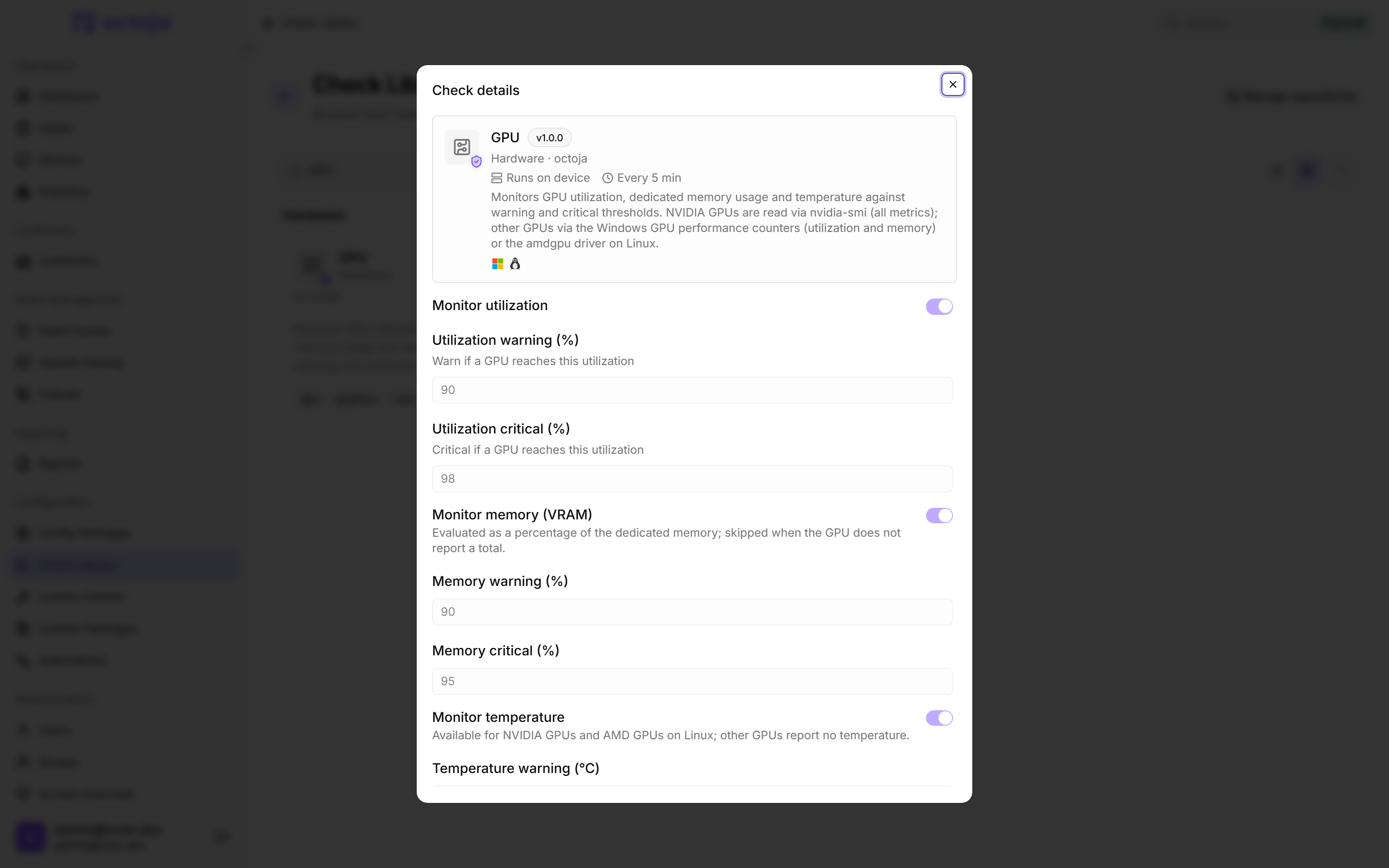
Seven new checks — NAKIVO Backup & Replication, Comet Backup, LAPS Passwords, Dell Warranty and NSLookup are joined by GPU and Secure Boot Certificates. GPU grades utilisation, memory (VRAM) and temperature per card on Windows and Linux — temperature comes from NVIDIA cards, and from AMD cards on Linux; other GPUs report none — and Secure Boot Certificates finds Windows devices still missing the 2023 CAs, which keep booting but no longer receive DB/DBX updates, bootkit revocations or boot manager updates. Before you assign them: Comet Backup, LAPS Passwords, Dell Warranty and Secure Boot Certificates are Windows-only, NAKIVO needs read-only access to the Director's database, Dell Warranty an API key and secret from Dell TechDirect and polls once a day, a broad LAPS assignment turns machines red that never had LAPS, and a device with no readable GPU warns until you set When no GPU is found to ignore it.
Narrow the SQL Server check to the instances, databases and jobs you care about — Microsoft SQL Server Health now narrows by instance as well as by database, and by SQL Agent job while Monitor SQL Agent jobs is on. Each of the three has its own monitor list and exclude list, and an exclusion always beats an inclusion. If you already limited the check to certain databases, you now get fewer disk-space and availability-group alerts — those finally honour the filter.
The MailStore check now covers MailStore Server too — The check now covers a plain MailStore Server: it is called MailStore (Server & SPE), and Edition picks the product — MailStore SPE (Management API) or MailStore Server (Administration API) — along with its default port. Unreachable servers come with a reason, and umlaut passwords work. Existing checks stay on the Service Provider Edition until you change Edition.
More control over which volumes the storage checks measure — In Disk Space, Monitor all drives is on by default and Drives to exclude picks the exceptions. Disk Fragmentation now lists ReFS volumes as n/a and measures folder-mounted ones, which may start alerting where nothing alerted before; use Exclude volumes to leave them out.
Four checks report more precisely — CPU Temperature now reports a failed or timed-out sensor query on Windows instead of a missing sensor; ignoring missing sensors no longer silences it, so silenced devices report again. APC UPS warns before a battery cartridge expires, and Pending Reboot can ignore pending file renames. Microsoft SQL Server Activity honours an Error log lookback (minutes) below five, which it used to stretch back to five.
Checks read command output correctly on non-English Linux and macOS — RAID Status, Firewall Status, Service Status, Disk I/O and a dozen more no longer misread other-language devices, so results on existing Linux devices change: those checks now report states they simply could not see before. The invented extra pending update on Linux is gone. User Account Audit stops counting Linux accounts as inactive when they never were, so those false entries disappear, and it gains an Excluded accounts list with wildcards.
Four hardware and SNMP checks stop crying wolf — HP iLO ignores drive bays the server cannot read and grades real faults harder: a Failed drive is critical, and Memory now warns on Degraded, a state it could not flag at all before, so a server with a degraded module starts warning. SMART Disk Health drops impossible temperatures and shows a dash. Network Interface counts the connected adapter, and Printer (SNMP) reads Brother devices reliably.
Antivirus checks report what is really going on — Antivirus Status stops double-listing a product and stops turning critical when Windows backgrounds Defender for another antivirus. Securepoint Antivirus Pro no longer calls Real-time protection Inactive on a quiet machine — it reads the newest status entry. Devices stuck on that false alarm turn green at their next run.
Synology Backup signs in, and stops inventing failed runs — Signing in to DSM failed outright on some installations; that is fixed, and a rejected sign-in now names the reason — wrong credentials, a disabled account, missing permissions, a two-factor code or a blocked address. Active Backup for Microsoft 365 tasks that ran cleanly are no longer reported as failed — a warning-level log entry alone no longer fails one of those runs, so devices stuck red turn green. The flip side: a task that has only ever warned can now look healthy.
Event Log counts only the severities you picked — With Minimum severity on Critical only, Critical + Error or Critical + Error + Warning, informational events no longer count towards the thresholds, while All levels (including Verbose) now takes everything. Devices that alerted on those three settings may fall silent; All levels may report more than before.
No offline alarm while the connection is still settling — Device online no longer turns critical just because octoja restarted or an agent dropped briefly; the previous result stands until the connection settles. A device back within 30 seconds stays green, and an outage just after an octoja restart may be reported up to six minutes later.
No warning when octoja itself turned automatic updates off — Windows Update Agent Health no longer warns that automatic updates are disabled when octoja's own patch management switched them off, so you can leave Alert if automatic updates are disabled on for the devices octoja patches.
OS End of Life reads long-term support — Debian, SUSE Linux Enterprise and Oracle Linux releases are no longer critical while extended support still covers them. That is the default, End of extended support (security updates only); alert on End of active/mainstream support instead and the earlier regular date still counts, so some turn critical instead of warning.
Mount Point Free Space skips unmounted volumes — Volumes with no mount point at all — typically EFI, recovery and reserved partitions — are no longer measured, and the details say how many were skipped.