octoja v1.0.1917 — Custom fields, automatic patch approval, mobile alarms
Highlights
octoja’s biggest release yet: 112 updates — two-thirds more than our previous record. It shapes octoja around how you work — custom fields that flow through checks, automations and rules, automatic patch approval, SMS and phone-call alarms, Active Directory on domain controllers, light/dark white-label branding, and a new Freshservice integration, plus a 2–3× faster dashboard and a long tail of check and patch fixes.
New
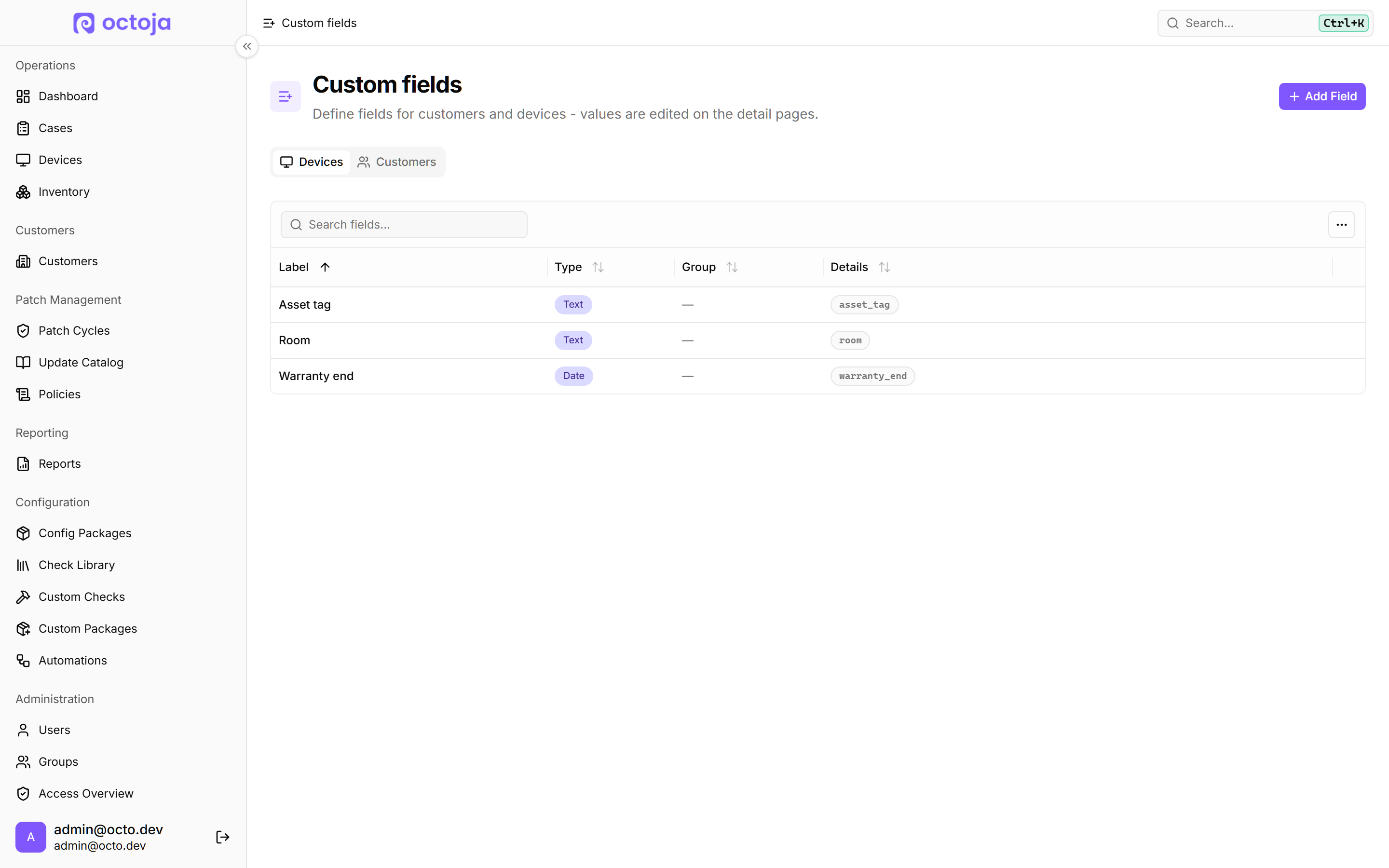
- Custom fields for devices and customers — Define your own fields in seven types, fill them in on the device or customer page, and manage them under "Administration" > "Custom fields".

- Checks, automations and rules can use your custom fields — Checks read and write a device's custom field, automations use them as variables and can set or clear one, and the rule builder gains a "Custom Field" condition.
- Approve patches automatically by rule — Set "Approval mode" to "Automatic approval" and add rules on "Severity", "Category" or "Title" to approve matching updates for the next maintenance window and defer the rest; a rule can also hold an update back until it is a set number of days old.
- Hold back Windows updates with a known Microsoft issue — A separate "Exclude updates with known problems" switch withholds any update flagged with an unresolved Microsoft known issue or a red or yellow community warning, until that flag is lifted.
- Alarms by SMS and phone call — Alarms now reach your team by SMS or phone call alongside the mobile app, via a group under "Integrations" > "Mobile notifications"; 500 SMS and 500 calls per month are included. Each group sets one language for all its SMS, call and app texts, and a new "History" tab shows which notifications were sent.
- Freshservice ticket integration — Connect Freshservice under "Integrations" and match your customers, and the new "Freshservice ticket" alert channel opens a ticket for every alarm and closes it on recovery.
- Device sync to the Freshservice inventory — Turn on "Sync devices to Freshservice hourly", or use "Sync now", to push your matched customers’ devices into Freshservice’s asset inventory. Works only on Freshservice accounts created after 31 March 2026.

- Invite users by email — "Invite User" emails an invitation; the recipient sets a password or uses your identity provider, and user management splits into "Users" and "Invitations" tabs where pending invites can be resent or revoked.
- Active Directory management on domain controllers — Domain controllers gain an "Active Directory" tab listing the users, computers and groups from the domain, where you create, disable or delete accounts and reset passwords without a remote session.
- Prevent local uninstall of the octoja agent on Windows — "Prevent local uninstall" hides the octoja agent from the Windows program list so everyday users can't remove it. Set it per device or through a configuration package — a deterrent rather than a hard block.

- Light and dark white-label branding — Branding now carries a separate logo, icon, brand colour and secondary colour for light and dark mode, in paired "Light mode" / "Dark mode" fields on the "Branding" page.

- New Network Shares check lists every SMB share and its permissions — Lists every SMB share on a Windows device with its share and NTFS permissions, flagging any open to Everyone, Authenticated Users, Anonymous or Guests.
- New OS End of Life check for Windows, macOS and Linux — Detects the installed Windows, macOS or Linux release and shows its active-support and end-of-life dates from the endoflife.date catalog.
- More Windows and Office inventory on the device page — The "System" tab of a Windows device gains "License Keys", "Network Shares" and "Mapped Network Drives" tables, "Roles & Features" on Windows Server, and an "OS build" row.
- Scope new automations and cases to a customer — A new "Customer" field in the "New Automation" and "Create Case" dialogs: limited accounts must set it, full-access accounts can leave it blank to run across every device.
- New CyberPower UPS, ATS and PDU check over SNMP — Reports battery status, load, remaining runtime, voltages, redundant supplies and transfer-switch state against your own thresholds.
- New Wortmann Warranty check reads the TERRA service portal — Looks a Windows device up in the Wortmann/TERRA service portal by serial number and reports its warranty period, remaining days and booked service.
- New DNS Blacklist (RBL) check watches mail-server reputation — Checks the IPv4 addresses you specify against DNS blocklists (Spamhaus, SpamCop, Barracuda by default) and alerts when one is listed.
- New Volume Shadow Copy Age check for Windows volumes — Reports how old the newest shadow copy is on each Windows volume that has one — an early warning for backups and Previous Versions that have quietly stopped working.
- vCenter check reads ESXi host hardware temperature sensors — It now judges every temperature sensor against the ESXi host's own firmware health.
- Open a past check result from the History view — Click a point on the history chart or a row in "History" to reopen that run's full result details instead of just its time and status; 51 more checks now carry that per-run detail.
- Ignore a single Lywand vulnerability from the device page — It stops counting toward the device's score but stays listed as "Ignored", and you can un-ignore it later.
- A Managed Lywand Score card on the customer dashboard — Customers with a Lywand assessment get a "Managed Lywand Score" card first — an A–F grade covering only the findings on products in your Lywand service package.
- Zip and extract files in the remote file explorer
- Wake an offline device — Choose "Wake device" and octoja sends a Wake-on-LAN packet from another online device sharing the target's subnet, or name the sender via "Wake using a specific relay". A gateway monitored over TR-064 also offers "Send Wake-on-LAN" for the inactive clients in its "Connected clients" table.
- Reuse an existing enrollment token when setting up deployment — The deployment configuration dialog gains a "Use existing" tab alongside "Create new".
- New Lightning Radar check warns about nearby lightning strikes — Enter an address or coordinates, or switch on "Use device location"; the result view plots the nearest strikes, names the closest one's distance and direction, and shows a thunder countdown to when its thunder would be heard.
- Connect DocBee with an access token instead of a username and password — The integration then runs on a token rather than a stored account password.
- Save your display language to your profile — octoja then applies your choice wherever you sign in, not just in the browser where you picked it.
Improved

- Faster dashboard — The dashboard opens roughly two to three times faster and stays responsive as you scroll long device lists.

- Group permissions now use access levels — Group permissions moved to their own "Permissions" tab, where each row has a single access-level picker — "No access", "Read" or "Read & write" — instead of a long checkbox list.
- Audit Log now records more than 85 administrative actions — Integrations, webhooks, enrollment tokens, alert configurations, patch cycles and more are now covered, and edits name the field that was touched.
- Per-device Asset Logs record remote actions and check changes — A device's "Asset Logs" now capture ad-hoc script runs, test package deployments and opening the "Web Console".
- Lywand vulnerabilities split into managed and unmanaged — A new "General view / Managed / Unmanaged" filter separates findings on products you cover (managed) from those outside your support scope (unmanaged); the "Managed Lywand Score" counts only the managed ones.

- Patch policies: optional deployment rings and hourly maintenance windows — Turn off "Use deployment rings" to patch every covered device together in a single maintenance window, and windows can now repeat as often as hourly.
- Schedule automations and reports to run every few hours — Automation triggers, a config package's "Schedule override" and report schedules now offer the "Every few hours" mode, repeating every 1, 2, 3, 4, 6, 8 or 12 hours.
- Rule builder suggests real fleet values and previews matches — Application and service conditions now suggest names actually found across your fleet with a device count each, preview which devices match, and a new "All Devices" template matches every device; the chassis-type condition also offers a pick list instead of free text.
- Rule templates in automation targeting and group device access — "Add from Template" now also appears under "Target devices" for an automation and "Device rules" for a permission group.
- Case comments update live — New comments appear in an open case automatically, with no reload — whether from a colleague or the person who reported it.
- Smoother remote desktop on slow connections — When the viewer cannot keep up, octoja lowers the frame rate and skips frames instead of building a backlog, then recovers with a fresh full image.
- Lists fill the page height with pinned column headers — Long lists use the whole window and keep column headers pinned as you scroll, so you don’t lose track of which column is which.
- The whole device row is clickable, not just the name — This applies in the device list and the Inventory "Hardware" tab; middle-click or Ctrl-click opens the device in a new tab.

- Check Library is faster and more informative — The Check Library opens noticeably faster and adds a sortable table view alongside the cards, and clicking a check opens a read-only preview of its full configuration.

- TV View runs as a full-screen wall board — The dashboard TV View now fills the entire window with no sidebar or app header, shows your branding logo, and adds a "Fullscreen" toggle.
- Failed Logon Alert is now Failed Logins, and covers Linux and macOS — It lists each failed attempt with time, user, origin and logon type, and uses its own time window and minimum count per severity.
- SentinelOne now reports a clear threat status — The SentinelOne check now reports a "Threat status" of "None" or "Not mitigated" on Windows and macOS, instead of counting quarantined files that linger after a threat is contained.
- Network Firewall check adds Sophos XG / XGS over SNMP — The "Network Firewall (Appliance)" check adds "Sophos XG / XGS (SNMP)" alongside the local variant, reporting CPU, memory and disk use, uptime, VPN tunnels and interfaces.
- Altaro and Hornetsecurity VM Backup 9 report in more detail — The Altaro Backup check now reports "Local backup", "Offsite copy" and "Restore / verification" separately, each with its last success, recognises Hornetsecurity VM Backup 9 too, and shows the reason (VM name and message) on a warned or failed backup.
- TERRA CLOUD Backup adds Hyper-V and expected backup days — The TERRA CLOUD Backup check now covers Hyper-V backups per virtual machine, and "Expected backup days" with a "Grace period (hours)" govern when a backup counts as "Overdue".
- Windows event log check can include events, not just exclude — Matches on event ID, source and message text, and „Minimum severity" now extends coverage through Information and Verbose.
- Network Interface check can ignore dead ports — An „Interfaces to ignore" option suggests the device's last-seen interfaces, so disconnected ports stop alerting while unlisted ones stay monitored.
- UniFi (SNMP) check can watch specific interfaces — Pick the ports the check should monitor, so on busy switches it reports only the interfaces you care about.
- System Updates can count optional and preview Windows updates — Turn on „Show advanced options", then „Include optional / preview updates (Windows)" to count optional, non-security updates like preview cumulative updates.
- QNAP check reports RAID health per storage pool — A "Storage Pools" section flags a degraded or rebuilding array as Critical, so you don't have to open the NAS interface; CPU temperature also gains its own warning and critical thresholds.
- Printer (SNMP) check picks up Brother toner and jam detail — Reads per-colour toner state, a paper-jam warning with location, and a „Colour" versus „Mono" page split from Brother printers.
- MailStore SPE check adds archiving runs and certificate expiry — „Check archiving profile runs" flags profiles whose latest run failed, and „Monitor certificate expiry" warns before the SPE management server's certificate expires.
- Custom checks can run longer than five minutes — A new „Timeout (min)" field accepts up to 60 minutes; existing checks keep the five-minute default until you change it.
- Manual check runs name the real failure reason
- Monitoring checks wait five minutes after a device restarts — This way a check's first result reflects a fully started system rather than one still booting; manual runs stay immediate.
- Remote actions and single sign-on linking show the real error
- Tracked Time, Logs and Inventory History move under Activities — The device page now groups these into a single "Activities" tab with sub-tabs, and old links still open the matching sub-tab.
- TANSS setup now takes a 2FA code and an ERP API token — "Set up TANSS" takes both from your TANSS configuration, and octoja keeps the session alive on its own.
- Agent logs survive updates and include check diagnostics — "Download logs" now returns error output from monitoring checks and background tasks too.
- Add your own parameters when creating or editing a package version — Define your own package parameters on any version of a custom package, not only while creating the package itself.
- More config package templates: physical servers, Hyper-V and warranty — "Start from Template" on "Config Packages" now also offers "Physical Windows Server Add-on", "Hyper-V Host", "Hyper-V Virtual Machine", "Lenovo Warranty" and "Wortmann / TERRA Warranty".
- Clearer reasons when a macOS update cannot be installed — A failed macOS update now shows the actual error, and updates that macOS will only install for a signed-in user are now listed as "Not Applicable" rather than "Failed".
- Add network device preselects your customer and site — "Add network device" preselects the customer and site you filtered by, lists only that customer's devices in the "Monitoring" picker, and adds "IP Camera" as a device type.
- Remote Desktop only appears on Windows devices — On Linux and macOS the entry led nowhere, so nothing is lost.
- Customer and site lists appear in alphabetical order — Sites on the customer edit page and the integrations' site pickers, plus the customers list, now sort by name regardless of capitalisation.
- Device tag rows adapt to the width instead of cutting off at three — A count badge opens the ones that don't fit.
Fixed
- Built-in patch-policy templates with tag-based rings work again — A policy created from one used to produce no patch cycles at all.
- Scheduled patch cycles no longer run twice, or repeat after a restart
- Checks from a config package template now use their real defaults — Any setting a template leaves out now comes from the check's own defaults instead of falling back to zero.
- A config package can no longer assign the same check twice
- Windows devices report every pending update again — Update sources are now scanned in parallel with a 120-second per-source timeout, so a slow source is no longer dropped from the scan.
- winget updates report a failure instead of a false success
- Bitdefender GravityZone servers are no longer flagged as unprotected
- Bitdefender and Securepoint checks stop reporting stale threats — Both now count only quarantine entries from the last 24 hours instead of the entire local vault, and the window is adjustable.
- Rules match Sophos firewalls and other agentless devices — Rules filtering on "Manufacturer", "Model" or "Serial Number" now match agentless devices such as firewalls, switches and routers.
- Automation installs no longer hang at "Running" — Software-install steps now run as background jobs that report back on completion, so the step shows its real outcome.
- The TANSS integration now works against real TANSS servers — Requests now use the "/backend" prefix live servers serve under, and the beta integration was rebuilt and checked against a live instance.
- Multi-language MSI installers import correctly
- Windows and Mac devices report their real name — Windows names longer than 15 characters now report in full, and Macs keep their stable System Settings name instead of flipping to a generic "Mac".
- Ubuntu 26 and newer Linux devices list their physical drives again
- Firewall Status check stops warning about healthy Windows firewalls — The check now reads the firewall state from the Windows registry instead of a service-and-WMI query that collapsed every failure into the same warning.
- ESET and Veeam checks name the real error instead of a false alert — A failed local query used to raise a critical alert whose empty health fields looked like protection was switched off.
- SMTP, FTP, IMAP, POP3 and SSH checks show their results again
- Failed runs show the right colour in a check's "History" view
- A check you start by hand gets its full time limit — A manually started check now waits its full configured time limit, up to about an hour, instead of reporting a false failure after 30 seconds.
- Scheduled reports run at the time you set — Reports now send in your instance's time zone instead of UTC.
- FortiGate and Check Point firewall checks show their own settings — Picking FortiGate (SNMP) or Check Point (SNMP) as the "Vendor" now shows the settings that belong to them, including the SNMP community string and the v3 credential fields.
- WatchGuard CPU readings are no longer pinned to 100%
- QNAP NAS check no longer reports empty drive bays as "Critical"
- Drives without SMART data now report "OK" instead of a warning
- UniFi (SNMP) checks on large switches return results again
- "Save" works when overriding a check on a network device
- Rotated and portrait monitors on Windows display upright
- Devices return to their original screen size after a session
- Typing in PowerShell no longer inserts stray "@" characters
- Remote sessions no longer drop when the session list refreshes
- The on-screen notice names every connected technician — When several technicians connect to the same machine at once, the on-screen notice now lists all their names instead of only one.
- TV View shows accurate, clearly coloured status — TV View no longer counts checks removed from their config package, tiles show green at zero, and "Servers offline" turns red when a server goes down.
- Reuse one email, Teams or webhook target across alert channels — The same email recipient, Teams channel or webhook can now sit at both "Warning" and "Critical" and escalate independently.
- Changing a check's alert settings no longer leaves alarms open forever — Detaching or changing a check's alert configuration now ends its open alarms and closes the linked PSA tickets, and a dialog warns you first how many active alarms that affects.
- Automations no longer print literal placeholders for a missing customer — When a device has no customer assigned, customer and site values now render empty in generated Cases, Teams messages and webhooks instead of raw placeholder text.
- "Run script" steps set to "Logged-in user" work on Windows again
- The service list is complete again and the "Start Type" picker stays usable — The "Services" tab now lists everything the machine is currently reporting, and the "Start Type" dropdown stays open while you choose.
- Long-offline devices no longer count toward your usage — Usage counts sent to octoja now include only devices seen in the last 90 days.
- Account scope now hides "Add Customer" and "Import Customers" — These actions and clearing a customer now require access to every customer; limited accounts have the first two hidden and the third refused.
- Autotask, HaloPSA and Lywand customer matching gains a usable menu — "Auto-match by name" and "Show only unmatched" have moved into the customer-matching dialog's "…" menu.
- "Custom Domain" now shows the correct CNAME "Target" — The "Target" now comes from your instance's configured address instead of echoing whatever address you were browsing.
- "Feedback portal" and "Help & docs" now open with you already signed in
- "Kill process" confirmation stays open while the list refreshes
- Dropping several files on a single-file upload area now warns you — Dropping more than one file now shows "Only one file can be uploaded at a time." instead of quietly keeping the first.